
Scaling content across a catalog of thousands is where most e-commerce teams hit a wall. Optimizing product pages one at a time doesn’t work past a certain size. So the sharper teams hand the repetitive parts to AI and automation: creating, optimizing, and managing content in bulk while keeping conversions in view. The payoff is concrete. Teams report cutting content creation time by up to 70% and still holding on-page optimization steady enough to move rankings and revenue.

Manual SEO content can’t keep pace with algorithm updates once your catalog gets big enough. That’s the real pressure. Automation stopped being a nice-to-have and turned into table stakes. This guide walks through how to put e-commerce SEO automation to work, which tasks pay back fastest, how to hold quality across thousands of pages, and which tools and strategies fit a growing store.
What Is E-commerce SEO Automation & Why Does It Matter?
Forget the idea that this is keyword insertion into templates. E-commerce SEO automation is a system for generating optimized product descriptions, meta tags, category content, and internal linking structures, built on AI, data analysis, and smart templates. Writing descriptions for 500 SKUs by hand eats a day. Automation platforms study competitor strategies, read search intent, and track conversion patterns, then hand you templates you shape to your brand.
Here’s the part that makes e-commerce different. A content marketing team might sweat over 20 to 50 cornerstone articles a month. You’re working at another scale entirely. Hundreds or thousands of product pages, plus category pages, subcategories, and internal linking that has to serve organic traffic and conversions at the same time. According to Moz’s foundational SEO research, on-page optimization for every page shapes rankings, and doing that by hand across a full catalog just isn’t realistic for most teams.
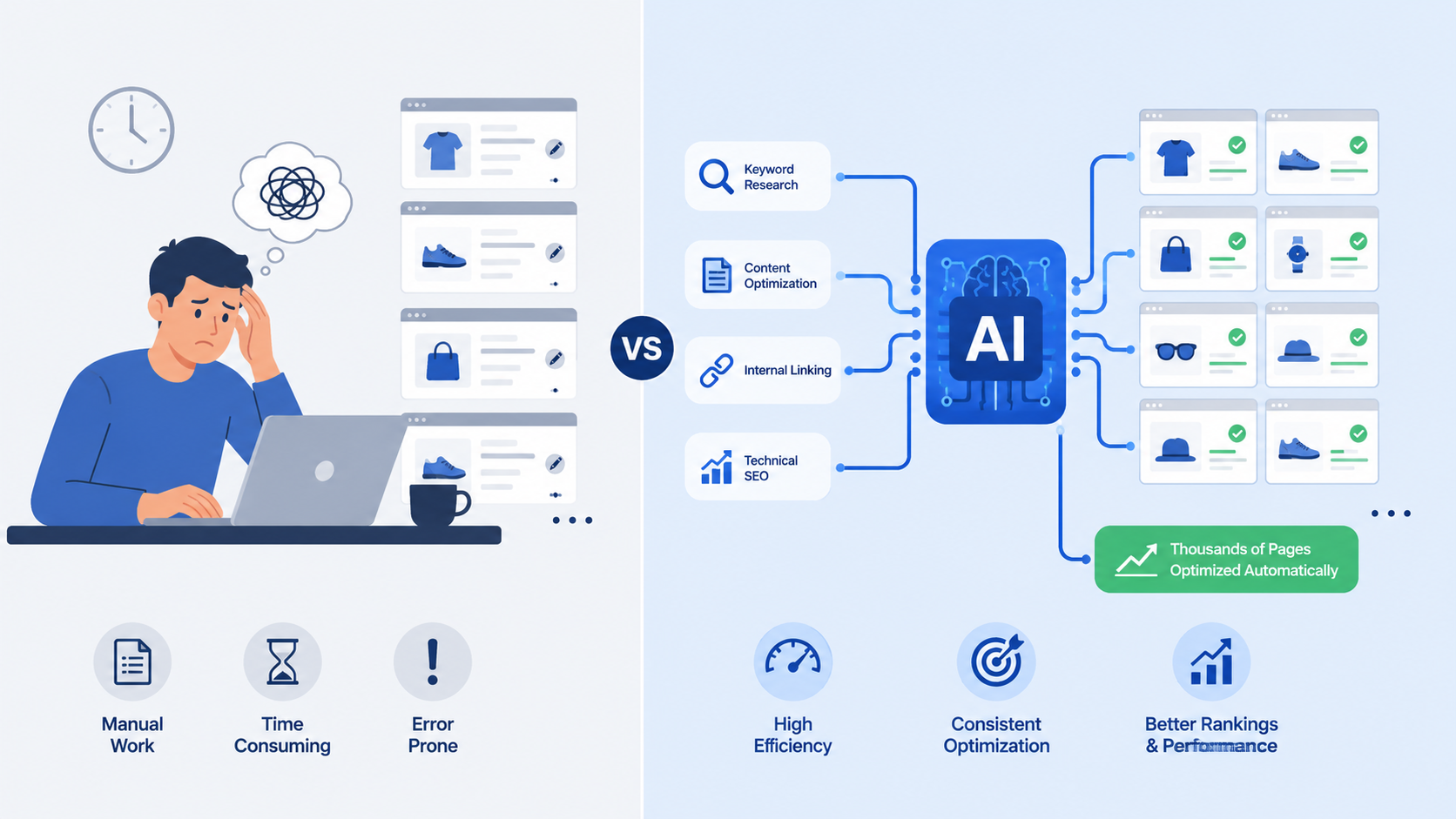
So what does automation actually fix? The core problem: manual SEO content creation eats time, and doing it faster usually costs you quality or consistency. Automation keeps both. It also gives teams without deep in-house SEO a standardized approach across the whole catalog. Set up conversion-driven templates once, and every automated page carries your brand voice, leads with product benefits, and works in the keyword variations your customers actually type.
Why E-commerce SEO Automation Outpaces Manual Optimization
Fifteen to thirty minutes. That’s what one product page takes by hand once you add up keyword research, description writing, and meta tags. Do the math on 200 pages and you’re staring at 50 to 100 hours. Automation drops per-page setup to 2 to 5 minutes after the template is built, so your team spends its hours on strategy, competitive positioning, and conversion work instead of the same task on repeat.
Speed is only half of it. Automated systems watch competitor pricing, keywords, and on-page tactics as they change, then adjust your templates to keep pace. Your content stays current with no monthly review sitting on someone’s calendar. In fast-moving niches where competitors shift tactics weekly, that gap compounds quickly.
How Does Product Page Automation SEO Work in Practice?
Product page automation runs on a structured workflow that turns raw product data into SEO-optimized, conversion-focused pages. Knowing the workflow tells you where realistic expectations sit and where your team still has to step in.
Step 1: Collect & Structure Your Product Data
Clean data comes first. Your system pulls from your product information management (PIM) system or e-commerce platform and pulls out SKU, product name, price, category, attributes like size, color, and material, inventory status, and existing meta tags. Modern platforms such as Shopify already keep this structured. Legacy or custom systems usually make you map it through CSV upload or an API integration.
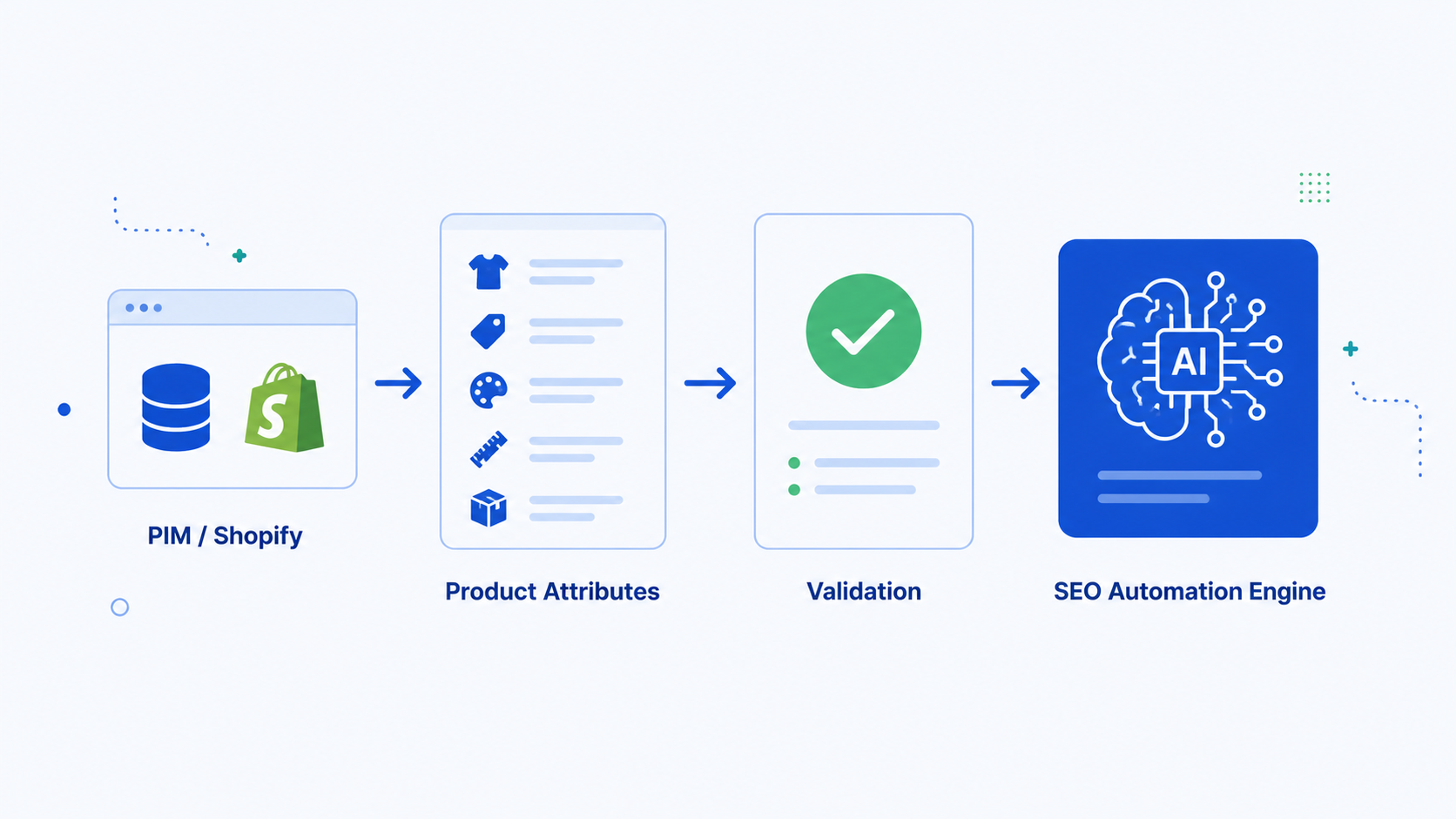
Nobody enjoys this part. It still decides everything downstream. Garbage in, garbage out, so spend the time auditing your product database before anything else. Hunt for missing fields, inconsistent naming, duplicate products, and stale information that will trip up the automation later. This is where most teams cut corners and regret it.
Step 2: Run Automated Keyword Research for Each Product
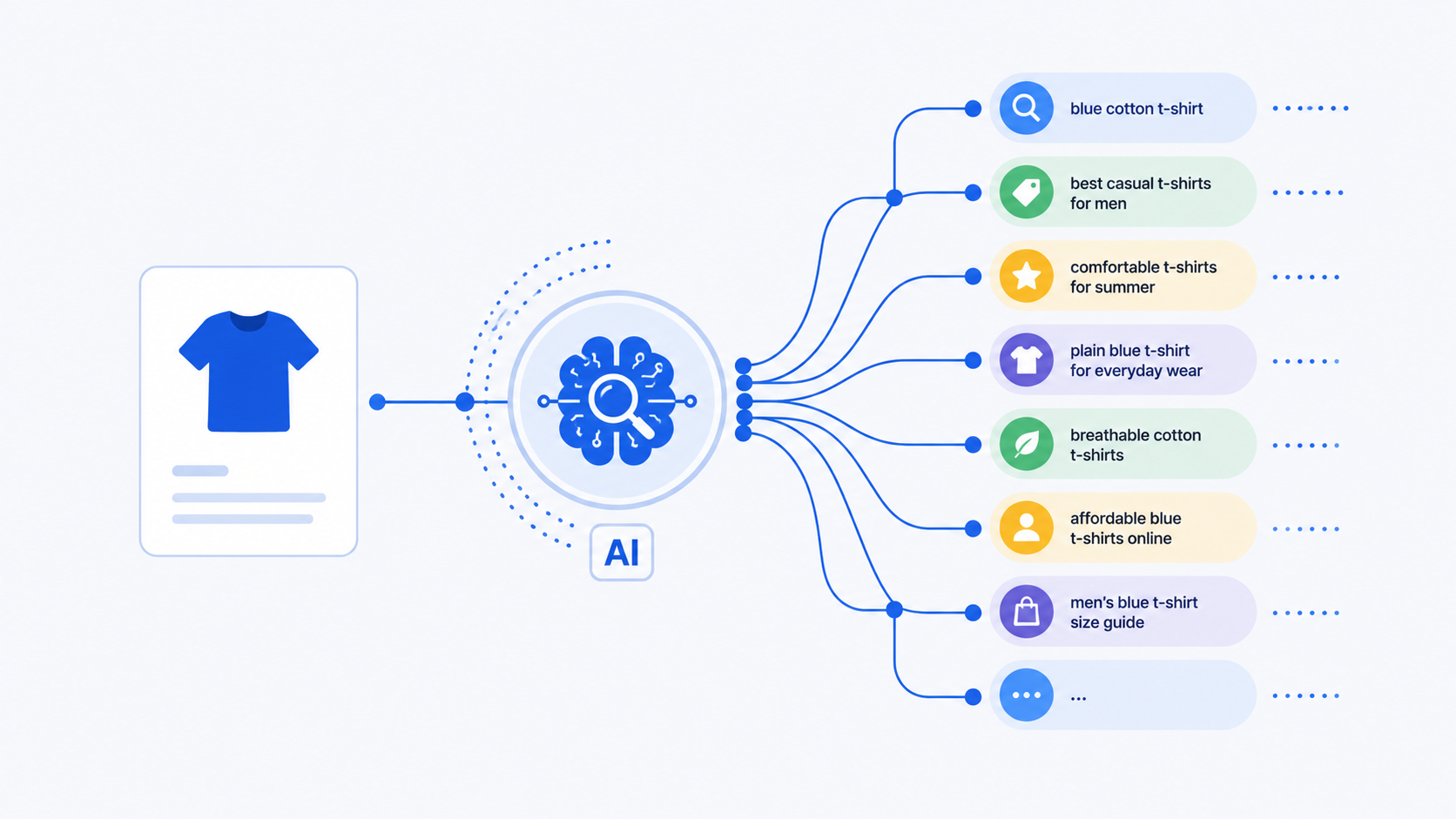
Researching keywords for every single product by hand is a non-starter. Automation platforms read your product data and surface search intent patterns on their own. Take “blue running shoes.” The system pulls related searches like “lightweight blue running shoes for women,” “waterproof blue training shoes,” and “best blue running shoes 2026.” Tools wired into Google Search Console and Keyword Planner find high-intent, low-competition variations. Each product page ends up targeting keywords that pull qualified traffic instead of generic terms buried under brutal competition.
Scale and consistency are the win. Nobody on your team researches keywords SKU by SKU. The automation handles discovery across hundreds of products at once, so high-opportunity keywords with real revenue behind them don’t slip through.
Step 3: Generate Optimized Descriptions Using AI Templates
AI systems write product descriptions that hold SEO and conversion intent together. A solid template usually looks like this:
“[Product Name] combines [key material/benefit] with [unique feature], making it ideal for [buyer persona]. Crafted from [materials], this [product type] delivers [primary benefit] while offering [secondary benefit]. Whether you’re [use case 1], [use case 2], or [use case 3], [product name] is designed to [value proposition]. Shop now and experience the difference [key advantage] makes.”
Each bracket fills from your product data and the automatically optimized keywords, so the copy reads naturally while still hitting the signals search algorithms look for. Because the structure follows real buyer intent, you get readable descriptions without keyword stuffing. According to Google Search Central documentation, content that matches user intent and answers the query directly outranks thin, generic descriptions. That’s the whole point of this structure.
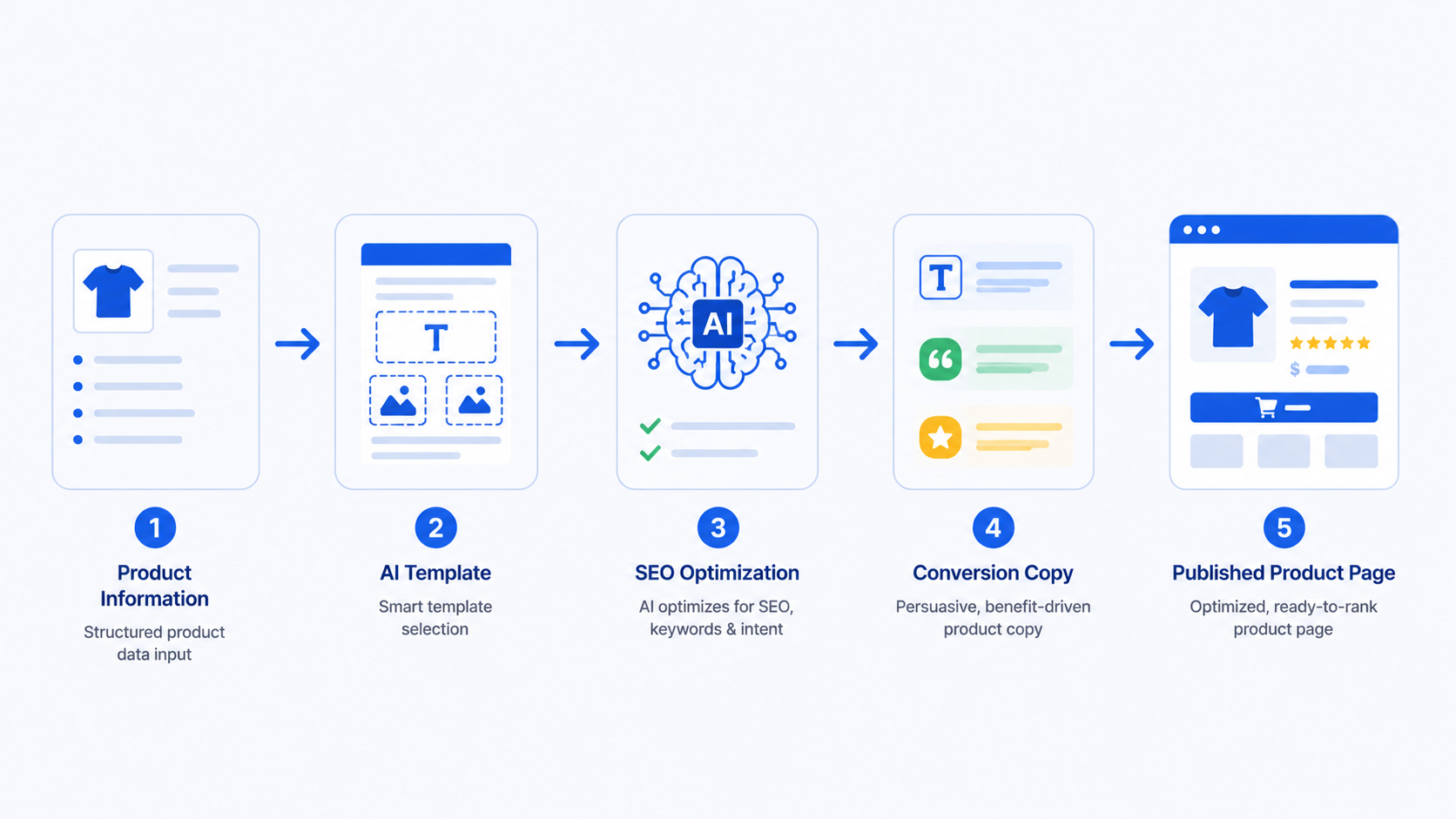
Step 4: Optimize Meta Tags & Add Structured Data
Automation writes unique, character-fit meta titles at 50 to 60 characters and descriptions at 150 to 160 characters for every product, with primary keywords landing inside the limits. It also generates Schema.org structured data on its own. Product schema, review schema, price schema. Search engines read your products more clearly, and rich snippet visibility climbs.
Rich snippets like product ratings, prices, and availability can lift click-through rates by 10 to 30%. They hand searchers confidence before they ever click your link.
Step 5: Monitor Performance & Adjust Dynamically
Good platforms don’t publish and walk away. They watch keyword rankings, click-through rates, conversion rates, and competitive moves without pause. A competitor launches a rival product on similar keywords, the system flags it and can rewrite descriptions to hold your position. Your product pages stay current, and no one has to block out a monthly review to make it happen.
How Should You Structure Category Clusters for SEO Automation?
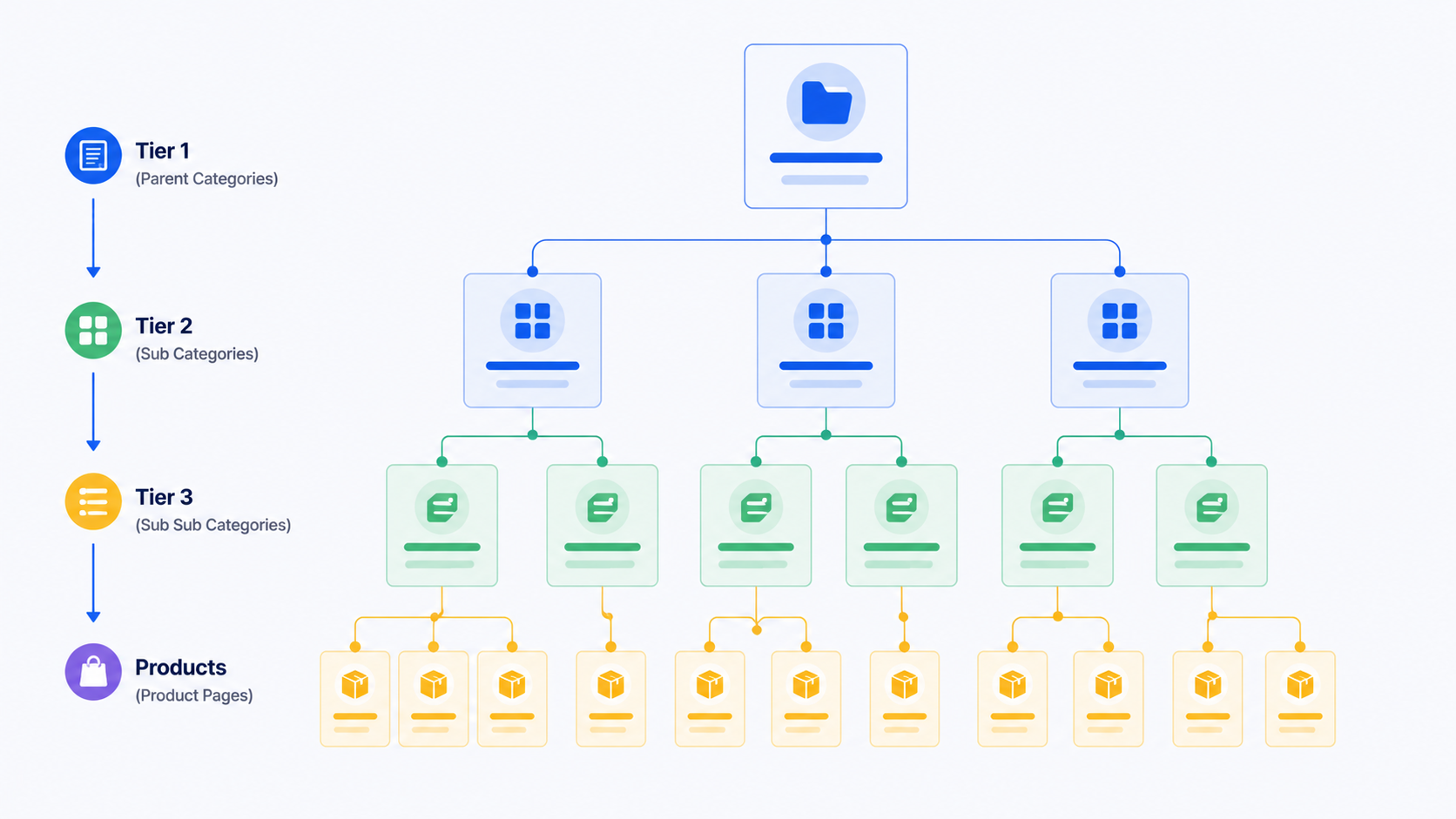
Category clusters are the backbone of e-commerce SEO structure. Build them well and automation scales with real intelligence, lifting both search visibility and authority flow across the site. Think of category clusters as the connective tissue tying product pages into one topical whole.
Building Your Hierarchical Category Architecture
Organize categories in a clear, logical hierarchy:
- Tier 1 (Parent Categories): Broad categories targeting high-volume keywords (e.g., “Women’s Running Shoes”)
- Tier 2 (Child Categories): Subcategories with mid-tail keywords (e.g., “Trail Running Shoes,” “Road Running Shoes”)
- Tier 3 (Grandchild Categories): Specific subcategories targeting long-tail keywords (e.g., “Women’s Lightweight Trail Running Shoes”)
Each tier wants its own automation approach. Tier 1 goes after high-volume, competitive keywords and works as a hub page that educates and guides. Tier 2 and Tier 3 chase mid-tail and long-tail keywords, lower competition but higher purchase intent. That split lets automation assign the right keyword difficulty and content depth to each tier, matching search demand to how much content a page really needs.
Automated Category Content Generation
Product pages chase the conversion. Category pages do something else: they act as content hubs that educate, compare, and walk buyers through the decision. Your category templates should carry:
- Category Overview: 150-200 word introduction explaining what this category includes, who benefits from it, and key buying considerations
- Key Features Comparison: Automated comparison table showing top products by price, key features, and customer ratings to help buyers choose
- Buying Guide Section: Automated content addressing common buyer questions (“How to choose running shoes?”, “What’s the difference between trail and road shoes?”) with FAQ schema markup
- Related Article Links: Internal links to related category pages and blog content answering secondary search queries
- Schema Markup: CollectionPage schema showing all products in the category, improving crawlability and enabling rich search results
Category pages then pull double duty. They give search engines broad topical coverage, and they help real people decide. Teams treat category pages like bigger product pages and pay for it in rankings.
Automating Internal Linking Strategy
Automated internal linking is where clusters earn their keep. Link child categories up to parents, Tier 3 up to Tier 2, and every one of them out to relevant product pages. A well-tuned system writes anchor text that carries category keywords naturally, “our best women’s trail running shoes” rather than a bare “click here,” so search engines read the topical relationships and link authority spreads across the site.
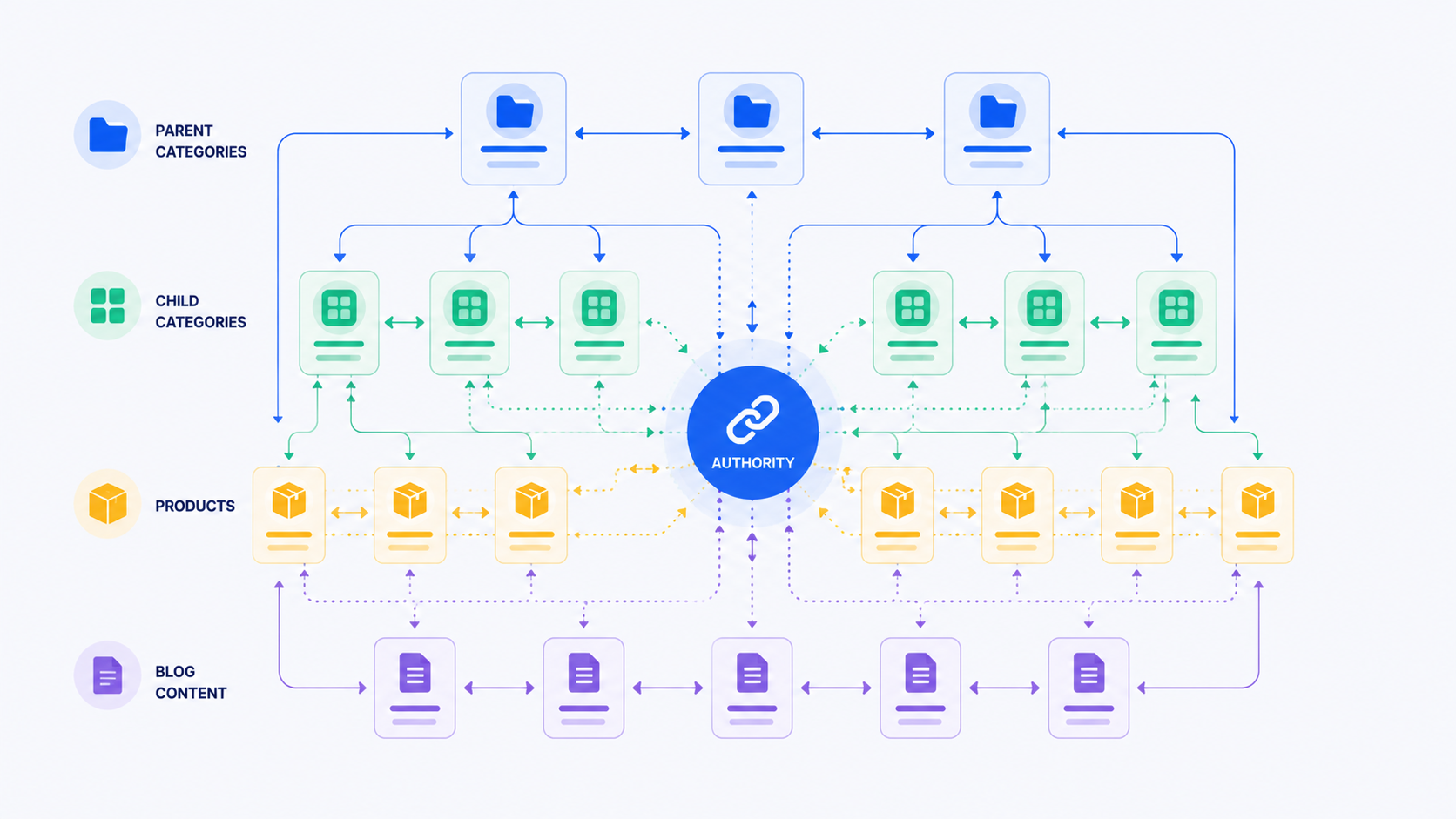
Moz’s research on internal linking strategies shows that strategic internal linking improves crawlability and lifts rankings for target keywords sitewide. Automate it well and internal linking becomes an edge manual sites can’t touch at scale.
What Are the Key Features of Effective E-commerce SEO Automation Platforms?
Platforms are not equal. The strong e-commerce ones fold keyword research, AI content generation, performance tracking, and smooth CMS integration into a single system. Here’s what sorts the winners from the rest.
1. Intelligent Keyword Research & Intent Analysis Built In
Look for platforms that read search intent for your products and categories without making your team research every keyword by hand. The system should pull from Google Search Console data, track competitor keywords, and watch search trends to surface high-opportunity keywords per product on its own. The better ones go further and spot intent gaps, places where competitors aren’t publishing and your products could take the space.
2. Customizable AI Content Templates That Match Your Brand
AI content moves fast, but it has to sound like you. Top platforms let you:
- Set tone parameters (formal, conversational, playful)
- Define content length targets (minimum and maximum)
- Specify required sections (benefits, specifications, use cases)
- Lock certain sections to manual writing while automating others
- Create different templates for different product categories
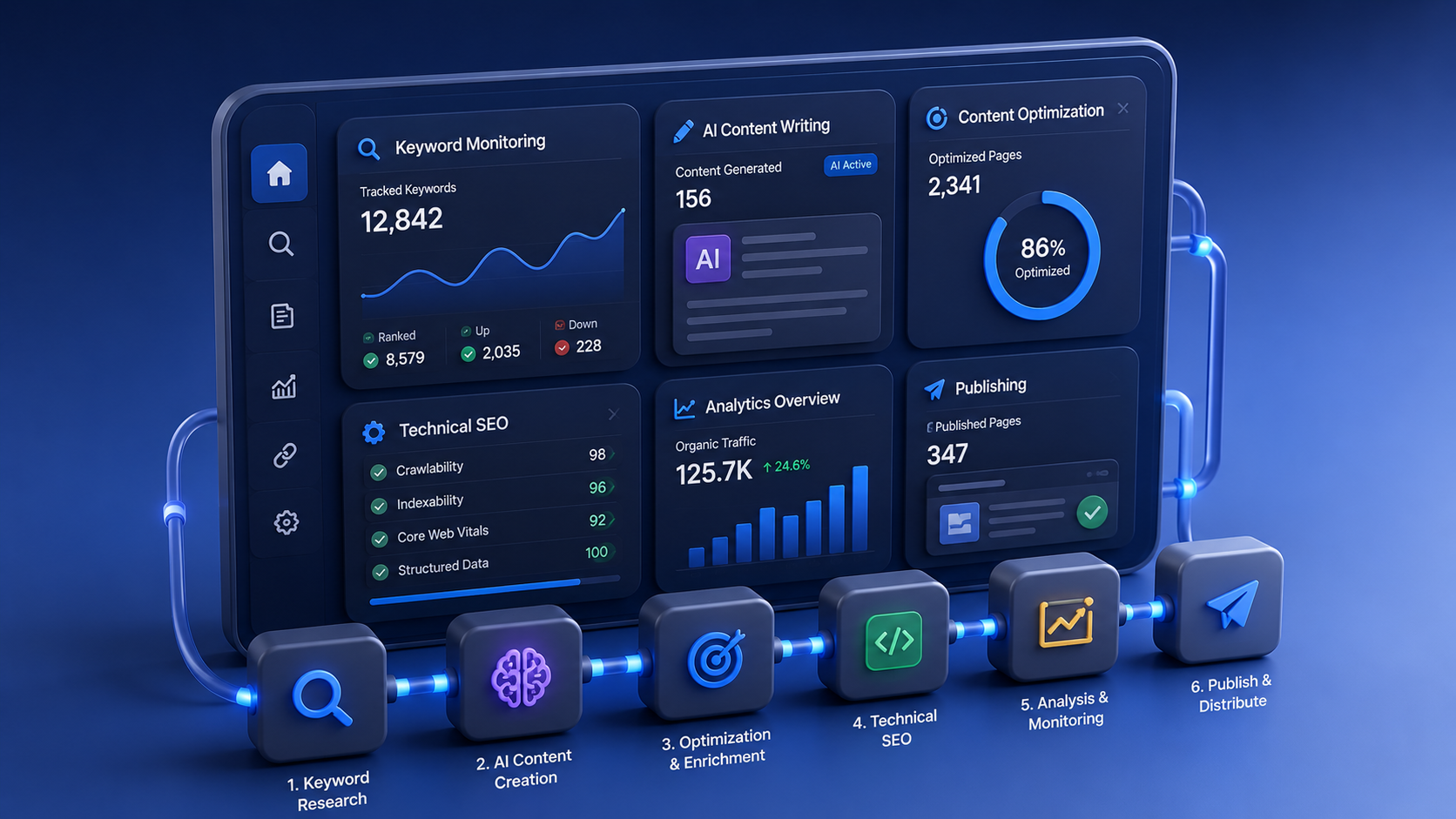
That flexibility kills the “every page sounds identical” problem that sinks generic tools. Your running shoes shouldn’t read like your hiking boots.
3. Seamless CMS & Platform Integration
Your tool has to connect straight to your e-commerce platform or CMS through an API or native plugin. The best ones integrate with Shopify, WooCommerce, Magento, BigCommerce, and custom builds. It has to run both ways: pulling product data in, and pushing optimized content back out to product pages, category descriptions, and meta tags. No copy-paste, page by page.
4. Multi-Language & Regional Variant Support
Selling across borders means your platform should generate region-specific and language-specific variants on its own. This goes past translation. It adapts content for regional search behavior, local competitors, and cultural preferences. What ranks in North America can miss the market entirely in Europe or Asia.
5. Performance Tracking & Competitive Intelligence
Automation is worth nothing you can’t measure. The tracking that matters:
- Keyword ranking monitoring for each product and category
- Click-through rate and organic traffic attribution per page
- Conversion tracking integration (connecting organic visitors to actual sales and revenue)
- Competitor keyword tracking and content analysis
- Automated alerts when rankings drop or competitors capture market share
Here’s the line that decides it. If the tool can’t tie results to your business metrics, you can’t prove ROI, and you won’t get the budget renewed.
6. Bulk Optimization & Intelligent Scheduling
Running hundreds of pages by hand defeats the whole point. Platforms should support bulk generation on a schedule you set. Optimize 50 pages Tuesday, 50 Thursday, leaving room for QA between batches and keeping the server from choking.
How Do You Maintain Brand Consistency While Automating at Scale?
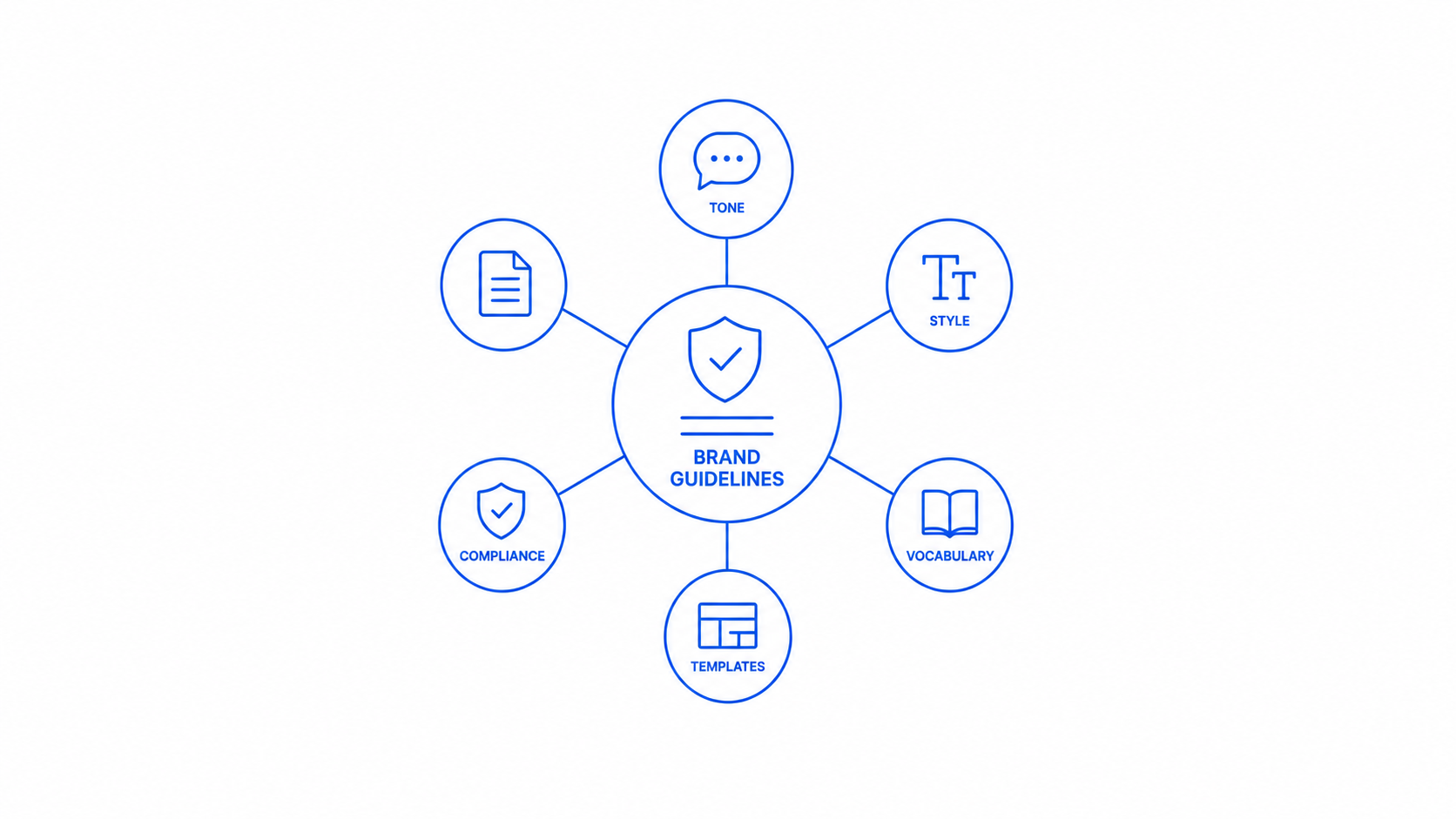
Consistency is the fear that keeps teams off automation. Will machine-written content hold your voice and quality across thousands of pages? It can, with deliberate systems and human oversight in the right spots. And the approach is well within reach.
Document Your Brand Voice in Actionable Parameters
“Maintain our brand voice” tells automation nothing. Write it down so the system can learn it:
- Tone Examples: Show the platform 3-5 human-written product descriptions that exemplify your brand voice
- Prohibited Phrases: List industry jargon, competitor names, or phrases you never want in your descriptions
- Required Elements: Specify which sections must appear in every product description (materials, benefits, use cases)
- Word Count Targets: Define ideal length for each content type (meta descriptions: 150-160 characters, product descriptions: 200-300 words)
Top platforms feed these inputs into their models and generate content that matches your existing materials. Call it a style guide the machine can actually follow.
Implement Quality Assurance Workflows That Actually Work
Set and forget is a myth. Systems that hold up include:
- Automated QA Checks: The system flags pages with missing keywords, duplicate content, keyword stuffing, or meta tag issues before publishing
- Human Review Gates: For critical pages (bestsellers, new launches, high-revenue items), require human approval before automation publishes
- Sample Review Process: Randomly review 5-10% of automatically generated content weekly to catch systemic quality issues before they scale
- Feedback Loops: When team members edit automated content, capture those edits as training data to improve future generations
- Category-Specific Standards: Apply stricter quality standards to high-revenue categories or pages targeting expensive, competitive keywords
Catch problems this way and quality climbs over time instead of drifting down.
Use Tiered Automation Based on Strategic Importance
Not every page deserves the same automation level. Split them:
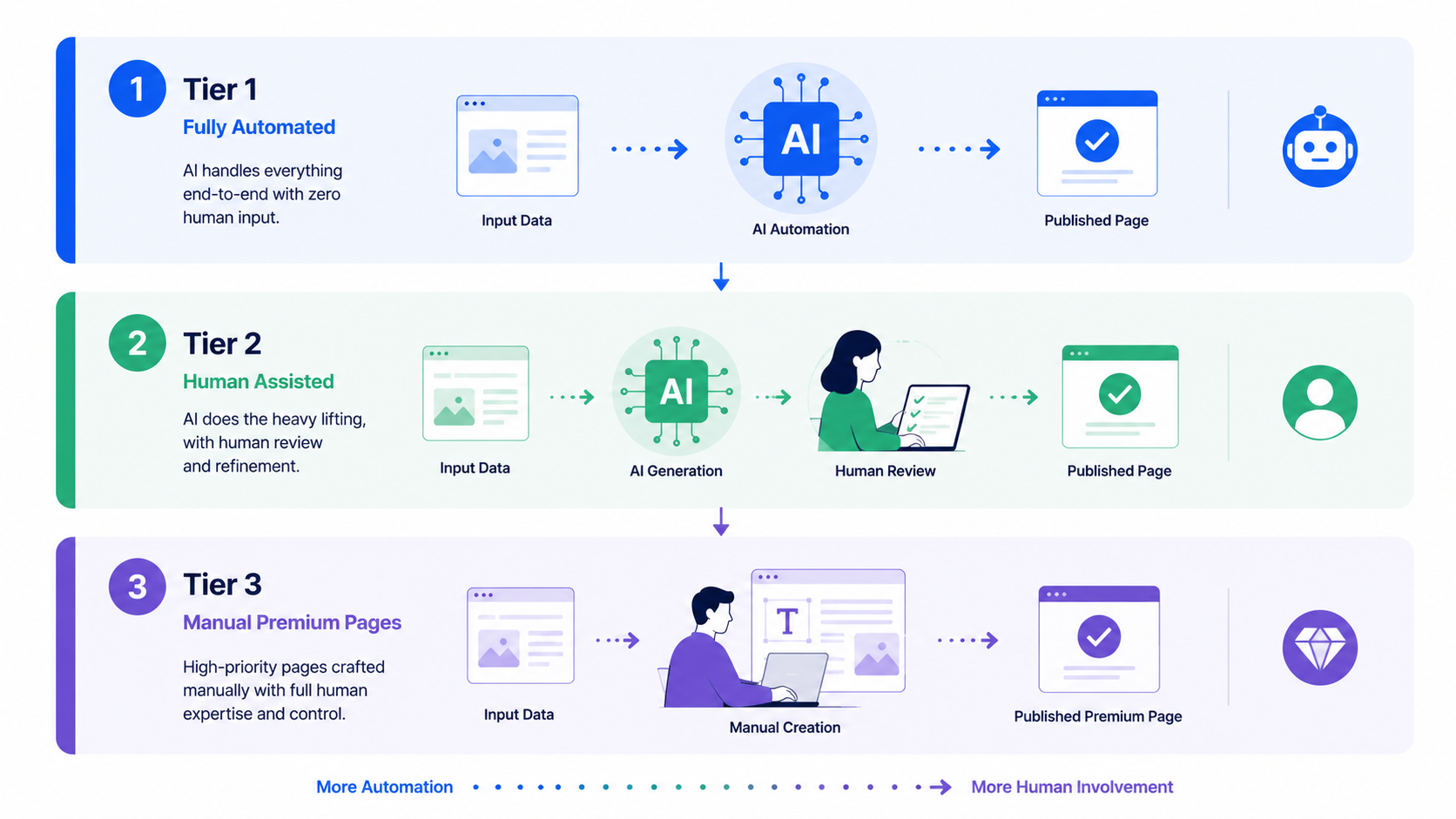
Tier 1 (100% Automated): Commodity products with high inventory turnover, standard specifications, and lower strategic importance. Examples include basic t-shirts, replacement parts, or products with minimal competitive pressure. These pages can be fully automated and published directly.
Tier 2 (70% Automated + 30% Manual): Mid-range products where automation creates the foundation, but your team reviews and adjusts unique selling points, feature comparisons, or special benefits before publishing.
Tier 3 (Manual with Automation Support): Flagship products, brand-defining items, or pages targeting expensive keywords. Keep product descriptions human-written to maintain full control, but use automation for meta tags, schema markup, and internal linking suggestions.
You get scale on the pages that don’t need a human, and control on the ones that carry your business. Automating everything was never the goal.
What Specific Automation Workflows Should You Prioritize First?
New to automation? Start with high-impact, low-risk tasks. They bank quick wins, build confidence inside the team, and give you momentum to push automation deeper into the catalog.
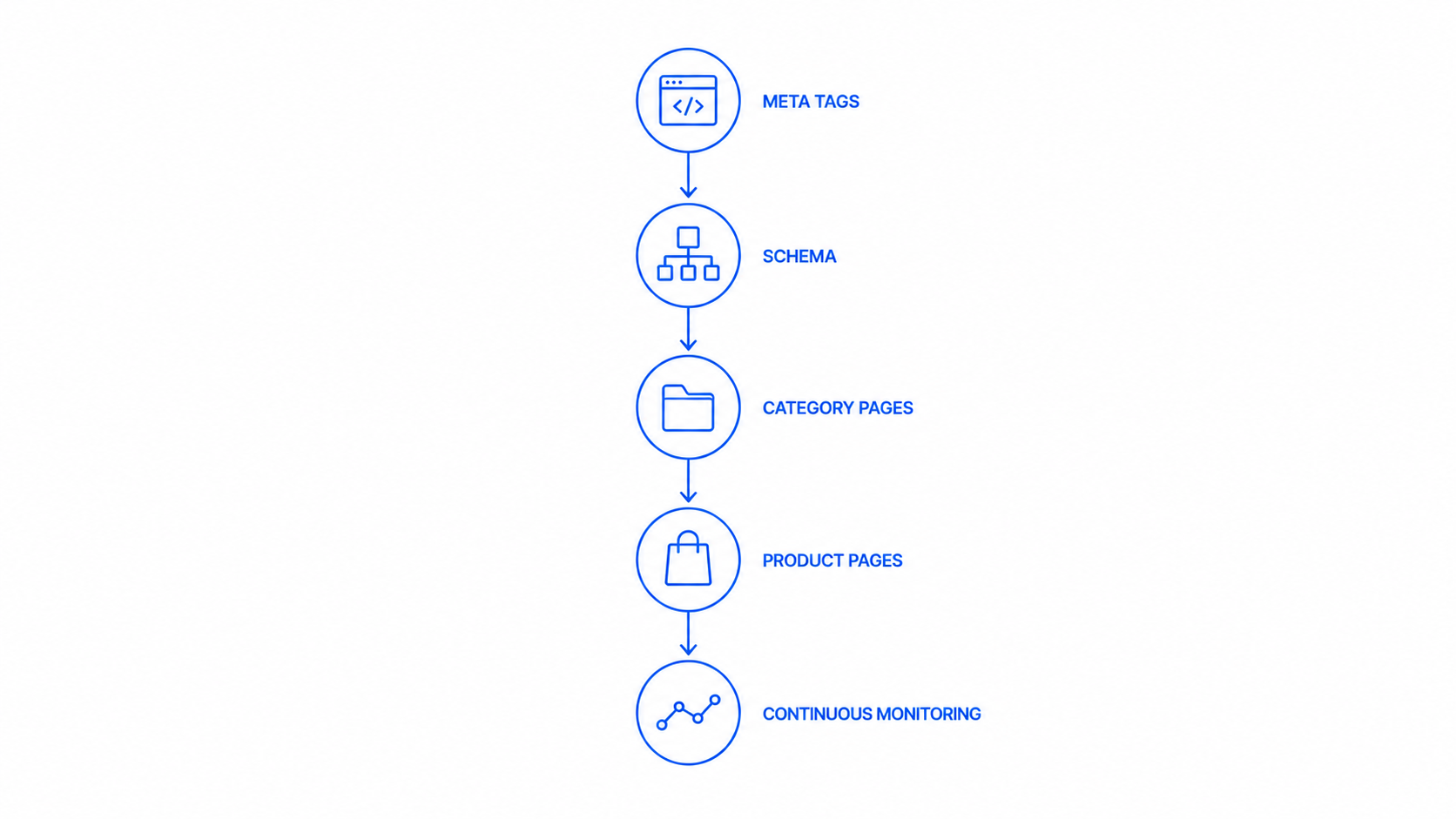
Priority 1: Meta Tag Automation (Start Here)
Meta titles and descriptions first. They’re formulaic, follow predictable patterns, and ask for no creative judgment. Automating them:
- Ensures every page has unique, keyword-optimized titles and descriptions
- Requires minimal setup (just 2-3 templates per product type)
- Delivers immediate ranking impact
- Needs minimal quality assurance (mostly syntax checking for character limits)
Example template: “[Product Name] | [Key Benefit] for [Buyer Type] | [Brand Name]”
Feed in “Blue Running Shoes | Lightweight & Comfortable | Stride Athletic” and the system generates: “Blue Running Shoes | Lightweight & Comfortable for Runners | Stride Athletic”
This one move can lift click-through rates by 10 to 20% inside weeks. Measurable ROI from a single initiative.
Priority 2: Schema Markup Automation
Meta tags handled, structured data is next. Schema.org markup (product schema, review schema, FAQ schema) helps search engines read your pages and can push rich snippet display, lifting click-through rates by 10 to 20%. Schema follows strict formatting rules, which makes it a natural fit for automation. Tools build it from your product data with barely any human touch.
Setup usually runs about a week and returns measurable CTR gains. Google’s structured data documentation shows product schema with ratings and pricing driving real visibility gains in search results.
Priority 3: Category Page Content Generation
Meta tags and schema done, move to category pages. They lean on structured templates:
- Overview text (100-150 words introducing the category)
- Buying guide section (300-400 words addressing common questions)
- Product comparison table (automated from category products)
- Related links (internal linking automation)
Category automation carries less risk than product pages, since these pages sit further from the direct conversion. Search engines and buyers already expect them to run content-heavy and educational.
Priority 4: Product Description Automation
The hard one. Save it for after the earlier priorities are running. Product descriptions demand real sophistication: SEO and conversion persuasion in the same breath, unique product attributes worked in, brand voice held steady. Start narrow, one category, test the templates, gather feedback, and lock in your quality bar before you roll it out sitewide.
Priority 5: Dynamic Content Updates & Monitoring
Foundational automation live, monitoring and updates come next:
- Update product descriptions when competitor pricing changes
- Refresh category content when new products launch
- Adjust keyword emphasis based on ranking performance
- Add new product categories as inventory expands
This layer keeps content current with no manual grind, holding your position over time without pulling more hours from the team.
How Do You Scale Content While Maintaining Conversion-Focused Messaging?
There’s a fear that optimized content sells to search engines and forgets the customer. It’s a false trade-off. The strongest content ranks and converts at once. Template design is what makes that true.
Design Dual-Purpose Content Templates
Your templates should carry sections that serve search and conversion at the same time:
Section 1: Keyword-Rich Hook (Serves Search Intent): Opens with keyword-rich phrases matching search intent. Example: “Lightweight blue running shoes designed for marathon training” naturally incorporates keywords while answering what the user searched for.
Section 2: Benefit-Driven Overview (Serves Conversion Intent): Follows immediately with benefits relevant to buyer pain points: “Our marathon running shoes reduce foot fatigue by 40% with proprietary cushioning, helping you maintain peak performance through mile 26.”
Section 3: Feature-to-Benefit Mapping (Serves Both): Lists product features then immediately connects to buyer benefit: “Waterproof upper:” Stay dry in wet conditions without sacrificing breathability. “Lightweight design:” Reduce fatigue with a shoe weighing just 7.2 oz per pair.
Section 4: Social Proof & Trust Signals (Serves Conversion): Includes aggregated review rating, customer count, and satisfaction rate: “Trusted by 50,000+ runners. Rated 4.8/5 stars. 98% satisfaction rate.”
Section 5: Use Case Targeting (Serves Search Intent): Addresses secondary searches and buyer personas: “Perfect for marathon runners, ultra-distance athletes, and trail enthusiasts. Also ideal for daily training and long-distance hiking.”
Automate Social Proof & Review Integration
The pages that convert best carry customer reviews and aggregated ratings. Automation platforms plug into review services like Trustpilot, Google Customer Reviews, and Yotpo to pull recent reviews and roll up ratings on their own. Two things happen at once:
- Provides fresh, user-generated content that search engines value (updated regularly)
- Builds trust and social proof that drives conversions
Advanced systems surface the top 2 to 3 reviews by relevance and recency, so the content stays fresh and stays real.
Use A/B Testing to Validate Automation Quality
Test alongside the rollout. On a subset of products, run A/B tests pitting automated descriptions against human-written ones. Measure:
- Keyword ranking changes month-over-month
- Click-through rate from search results
- Conversion rate per visitor
- Average order value
The test data tells you whether your approach holds, and which template types win for which product categories. Feed the winners back into your templates before the wider rollout. Evidence replaces guesswork, and that’s what earns confidence in the strategy.
What Challenges Should You Anticipate When Implementing E-commerce SEO Automation?
Know the pitfalls and you dodge them during setup. Every one of these is predictable, and every one has a fix.
Challenge 1: Data Quality Issues Can Derail Everything
Automation only rises to the level of your input data. The usual data problems:
- Incomplete product information (missing categories, attributes, prices)
- Inconsistent naming conventions (“Women’s Running Shoe” vs. “Womens Running Shoes”)
- Duplicate products under different SKUs
- Outdated inventory or pricing information
Clean the data before you automate. Audit the catalog, standardize naming, merge duplicates, and fill the critical fields. That 1 to 2 week push upfront saves you months of fighting bad output later. Clean data is the whole foundation, and teams skip it more often than they should.
Challenge 2: Over-Optimization & Keyword Stuffing
Let the algorithm chase keyword count over readability and you get copy that reads badly and fails modern search tests. Head it off:
- Setting maximum keyword density limits (1.0-1.5%)
- Requiring keyword variations instead of exact-match repetition
- Using semantic keyword clustering (including related terms, not just the exact keyword)
- Building in readability checks (Flesch-Kincaid grade level, sentence length variation)
Run generated content against these standards in QA. Copy that reads poorly ranks poorly once Google’s algorithms weigh user experience.
Challenge 3: Lack of Differentiation Between Similar Products
Generate content from identical attributes and near-identical products come out with near-identical descriptions. That flattens your catalog and can flag duplicate content. Fix it:
- Creating unique templates for different product types (basic vs. premium, entry-level vs. professional)
- Feeding unique data into templates (brand story, sustainability practices, manufacturing origin)
- Automating product comparison sections highlighting differences between similar SKUs
- Using automation for standardized sections while reserving differentiation for human input
Challenge 4: Integration Complexity & Technical Issues
Wiring automation into your e-commerce platform brings technical friction. The usual suspects:
- API rate limits causing incomplete syncing
- Character encoding issues causing special characters to display incorrectly
- Conflicts between automation updates and manual edits
- Plugin conflicts with existing SEO or page builder tools
Test hard in a staging environment before you go live. Set clear rules for manual edits, run automation in off-peak hours, and keep a rollback plan ready.
Challenge 5: Keeping Pace with Algorithm Evolution
Search algorithms move, and templates built for 2024 can read stale by 2026. Google’s push on E-A-T (Expertise, Authoritativeness, Trustworthiness), for one, might call for more author credentials inside product content. Stay ahead:
- Staying current with SEO industry updates
- Conducting quarterly template reviews to incorporate new best practices
- Monitoring your rankings and updating templates if performance drops
- Joining SEO communities to learn what’s working across the industry
Automation actually makes testing new strategies easier. Change one template across 100 pages in minutes, and you learn faster than any manual team could.
How Do You Measure Success of Your E-commerce SEO Automation Program?
No metrics, no case for the budget. Automation success rides on clear numbers that show ROI. Skip the measurement and you’re running blind.
Core Business Metrics to Track
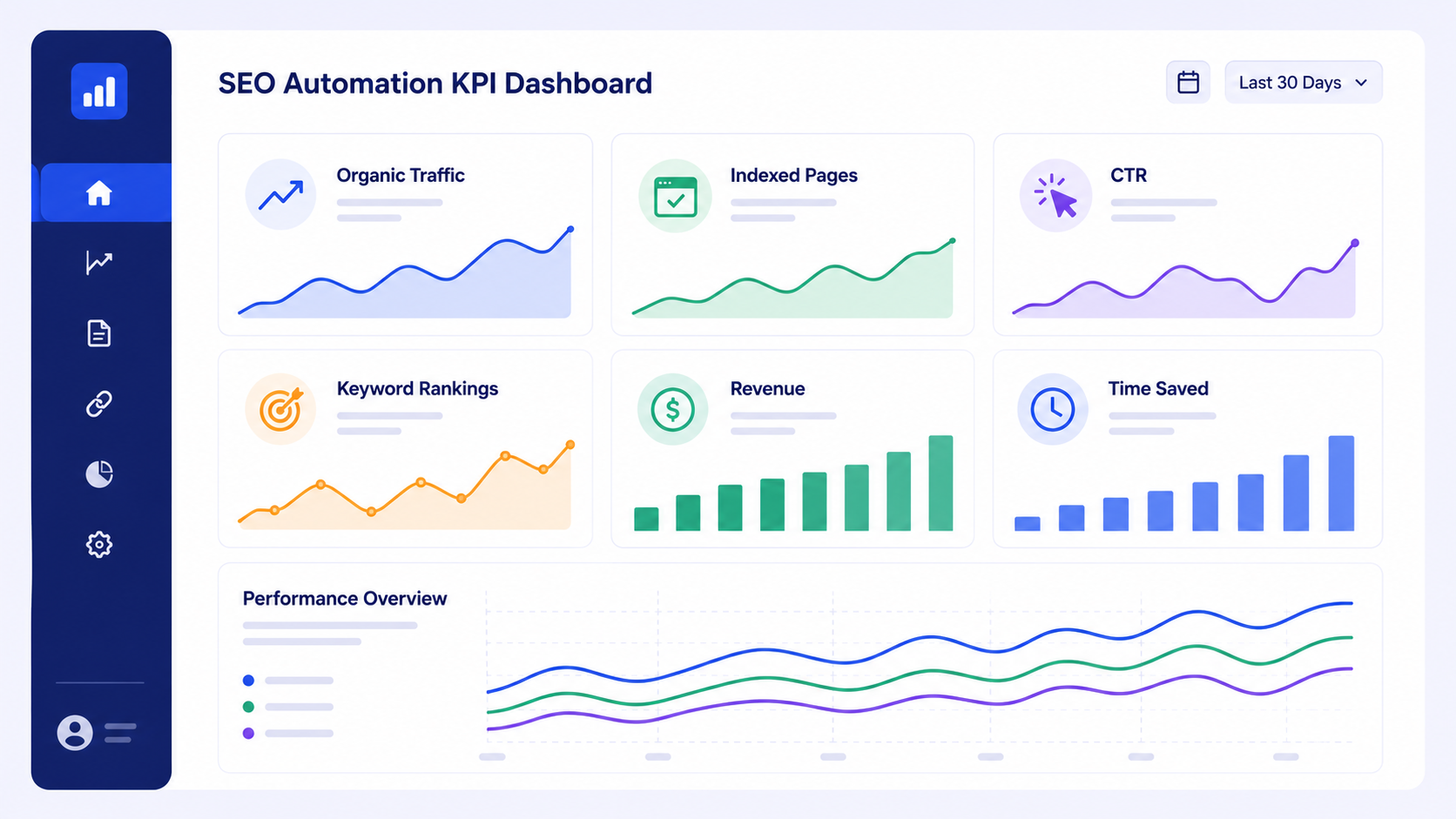
- Organic Traffic Growth: Monitor monthly organic visitors to automated pages versus non-automated pages. Expect 30-60% growth within 6 months if your automation quality is high.
- Keyword Rankings: Track ranking improvements for target keywords. Most pages should see noticeable movement within 4-8 weeks of publication.
- Click-Through Rate (CTR): Measure CTR from search results for automated pages. Better meta titles and descriptions should boost CTR by 15-30%.
- Conversion Rate: Compare conversion rates between automated and manually optimized pages. They should be comparable or similar.
- Revenue per Organic Visitor: Divide organic revenue by organic visitors. This shows whether automation is driving quality traffic that converts.
- Indexed Pages: Monitor how many pages Google indexes. Automation should increase index size as you cover more products and category combinations.
Implementation Metrics (Efficiency Gains)
These track the efficiency automation buys you:
- Content Production Speed: Track hours per page before and after automation. Document time savings weekly for the first month to quantify impact.
- Cost per Optimized Page: Divide monthly tool cost by number of pages optimized. With automation, cost-per-page drops from $5-10 (manual labor) to $0.10-0.50.
- Team Capacity Freed: Calculate how many hours per month your team spent on routine optimization tasks. Automation should free 40-60% of this time for strategic work.
- Consistency Score: Track percentage of pages meeting quality standards. Automated pages should meet standards 85-95% of the time.
Expected Timeline for Results
Weeks 1-2: Setup and configuration. No ranking changes yet.
Weeks 3-8: Initial pages published. Some rankings may fluctuate as Google re-crawls and re-indexes (normal during content changes). Monitor closely for issues.
Weeks 8-12: Rankings begin stabilizing. New pages show ranking improvements. CTR improvements visible in Google Search Console.
Months 4-6: Organic traffic from automated pages exceeds pre-automation baseline. Revenue attribution becomes clearer.
Industry benchmarks put well-run e-commerce SEO automation at 30 to 50% organic traffic growth within 6 months and 80 to 120% within 12 months, depending on catalog size and how hard the competition pushes.
Calculate Clear ROI
Data in hand, run the ROI:
Example: Your automation platform costs $500/month, generates 5,000 additional organic visitors monthly, and 2% convert at $100 average order value.
- Monthly additional revenue: 5,000 × 0.02 × $100 = $10,000
- Monthly automation cost: $500
- Monthly net profit: $10,000 – $500 = $9,500
- ROI: ($9,500 / $500) × 100 = 1,900%
Show numbers like that and expanding automation into more categories sells itself, to your team and to leadership.
How Do You Choose the Right E-commerce SEO Automation Tool?
The market splits three ways: dedicated e-commerce platforms, general SEO tools bent toward e-commerce, and the basic features baked into your store platform. Which one fits comes down to your needs, budget, and technical depth.
E-commerce-Specific Automation Solutions
Platforms built for e-commerce ship features tuned to product catalogs:
- Deep CMS Integration: Native plugins for Shopify, WooCommerce, Magento, and other major platforms
- Product Attribute Handling: Automatically use product properties (size, color, material, price) in content generation
- Bulk Operations: Process hundreds of products simultaneously
- Category Management: Specialized templates for category and subcategory pages
- Inventory-Aware Content: Automatically update content status based on stock levels
- Conversion Optimization: Templates and testing features designed for product pages
These run $300 to $1,500/month by catalog size. They’re purpose-built for e-commerce and usually return stronger results on product-focused optimization.
General SEO Automation Tools Adapted for E-commerce
Broader SEO platforms (Surfer SEO, SEMrush, Ahrefs with automation features) work for e-commerce but ask for more manual setup. They shine at keyword research and competitive analysis, then leave your team to build the product-specific workflows. Figure $200 to $800/month, and figure they pay off best when your team already knows SEO.
Comprehensive Evaluation Criteria
Weighing e-commerce SEO automation solutions, check these:
- Integration & Data Connectivity: Does it connect to your e-commerce platform? Can it reliably pull and push data?
- Content Quality & Customization: Can you customize tone, length, and template structure? Does generated content match your brand?
- Keyword Research Capability: Is keyword research automated per page, or do you provide keywords manually?
- Scaling Capacity: Can it handle your catalog size? Test with 100-200 products before committing site-wide.
- Monitoring & Reporting: Does it track rankings, traffic, and conversions for pages it generates?
- Pricing Model: Per-page pricing (scales with catalog), flat-rate (predictable), or usage-based (pay for activity)?
- Support & Training: Is onboarding support included? Can they help with template creation?
- Learning Curve: How long until your team is productive? Can non-technical members use it?
Red Flags to Avoid
“Hands-off automation” claims: Any claim that automation needs zero oversight is fiction. Plan on 5 to 10 hours a month for QA and strategy.
Cheap pricing with hidden fees: Low base prices tend to hide per-page costs or overages that stack up fast.
Poor integration history: Read reviews from users on your exact platform. Weak integration turns into daily frustration.
Generic content quality: Run the tool on 10 to 20 of your real products. If the output reads inconsistent or generic, it won’t fix itself at scale.
Lack of performance tracking: A tool that can’t tie results to your metrics leaves you with no way to measure ROI.
Spend real time on selection. The right tool becomes a cornerstone of your marketing efficiency, and the wrong one drains money and patience while your team fights it.
Frequently Asked Questions
How much time does e-commerce SEO automation actually save?
Manual product page optimization usually runs 15 to 30 minutes per page. Automation drops per-page setup to 2 to 5 minutes once your templates are configured. On a 200-product catalog, that’s 50 to 100 hours saved per cycle, hours your team can put toward strategy instead of the same task on repeat.
Will automated content hurt my SEO rankings?
Done right, no. The risk was never automation itself. It’s bad automation. Conversion-focused templates, clean keyword integration, and real QA workflows push rankings up, not down. Industry data puts properly built automation at 30 to 120% organic traffic growth within 6 to 12 months.
Can automation maintain my brand voice across thousands of pages?
Yes, if the systems are deliberate. Write your brand voice into specific parameters, set your tone preferences, and train the platform on samples of your best content. Lean on tiered automation, 100% for commodity products, 30% manual for flagship items, to balance scale against quality.
How do I prevent keyword stuffing with automation?
Cap keyword density at 1.0 to 1.5%, require variations over repetition, use semantic clustering to pull in related terms, and build readability checks into QA. Confirm generated content clears those standards before it publishes at scale.
What’s the ROI of implementing e-commerce SEO automation?
It varies, and it’s usually big. Take a $500/month platform that brings 5,000 extra organic visitors at 2% conversion and $100 AOV. That’s $10,000 monthly revenue on $500 of cost, a 1,900% ROI. Most implementations earn back their cost inside weeks.
Should I automate everything or use a tiered approach?
Tier it. Fully automate commodity products at 100%, run mid-tier products at 70% automation with 30% human review, and keep flagship or high-revenue items mostly manual. You scale impact and hold quality where it counts.
How long until I see ranking improvements from automation?
Weeks 1-2: setup. Weeks 3-8: initial pages published, and some rank fluctuation is normal. Weeks 8-12: rankings settle and gains show. Months 4-6: organic traffic growth turns measurable. With a quality build, expect 30 to 50% traffic growth within 6 months.
What if competitors use the same automation tool?
The tool was never the edge. Your data, templates, and strategy are. Clean product data, sharp template design, solid brand guidelines, and steady optimization against performance data set you apart. Two companies on identical tools land in completely different places.
