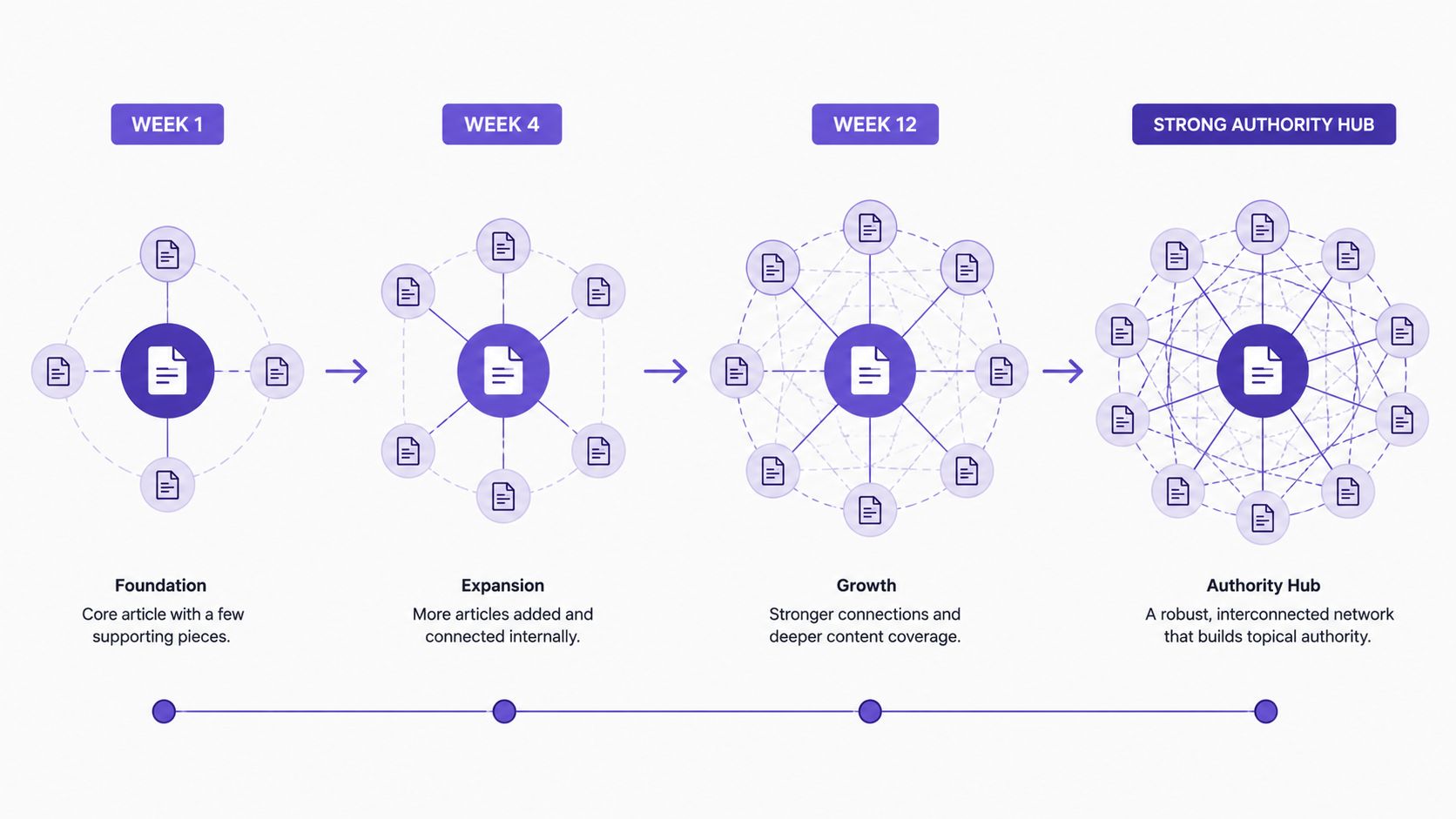

Automating your internal linking strategy might sound like a technical project, but it’s actually one of the most powerful ways to build topical authority at scale. Instead of manually linking articles one by one, you can define rules that automatically connect relevant content the moment it’s published. This approach combines search intent mapping with rule-based internal linking templates to create a structured web of topical signals that search engines reward. When done right, internal linking automation ensures every new article contributes to your topical authority immediately—without manual work or the risk of inconsistent linking patterns. In this guide, we’ll walk through designing effective linking rules, classifying content by user intent, implementing publish-time automation, and maintaining your system as it scales. Whether you’re publishing five articles per week or fifty, this strategy eliminates the linking bottleneck and frees your team to focus on content quality and strategy.
What Is Search Intent Mapping and Why Does It Matter for Internal Linking?
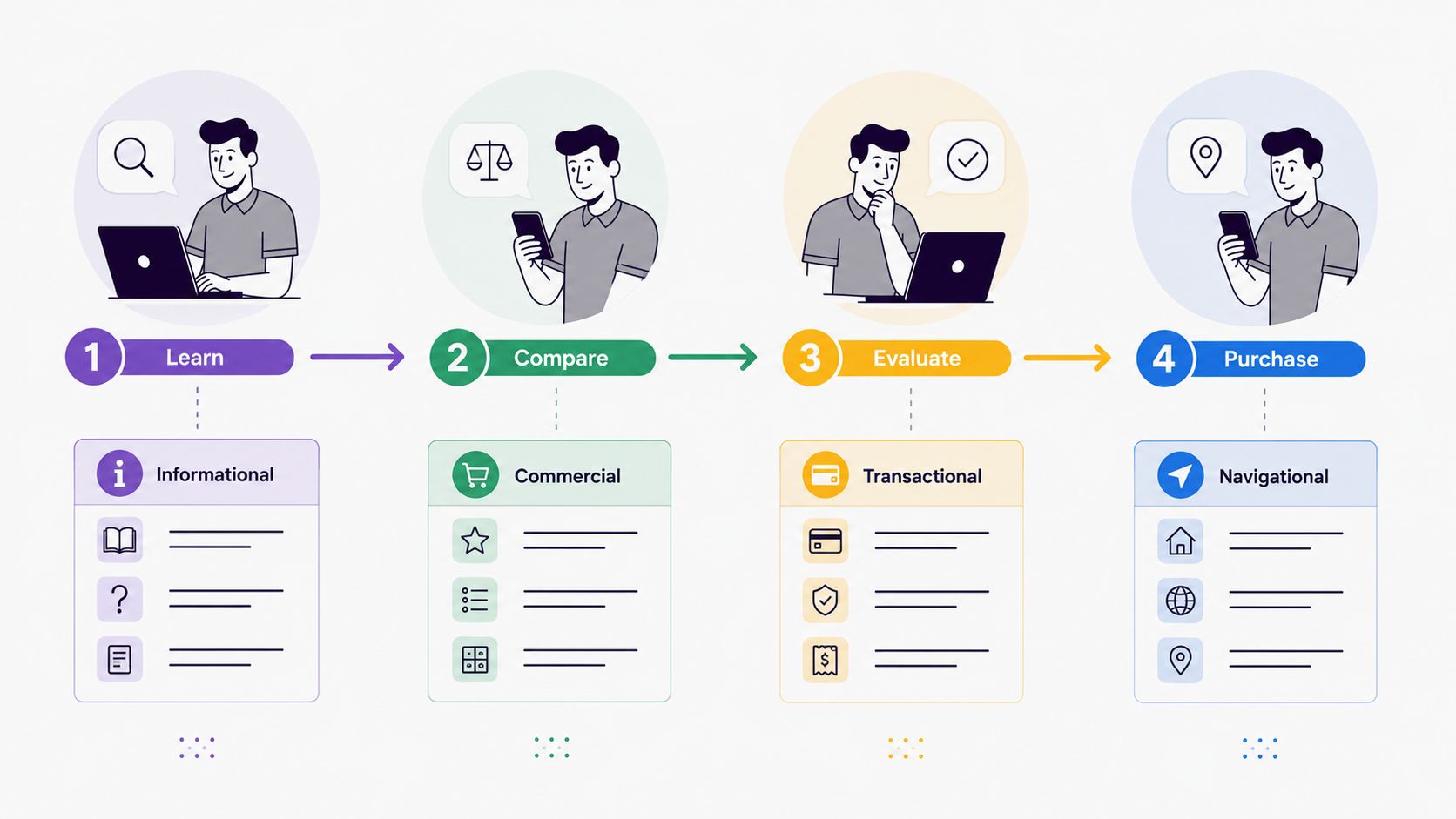
Search intent mapping is the process of categorizing keywords and the content targeting them by user intent—what a searcher actually wants to accomplish when they type a query. Rather than treating all keywords as interchangeable, intent mapping recognizes that “best SEO tools” (commercial intent), “how to do SEO” (informational intent), and “SEMrush” (navigational intent) serve fundamentally different audience needs. This distinction is critical for internal linking. When you understand intent, you can link strategically: guide users from informational content to commercial intent pages to nudge them closer to conversion, or connect related informational articles to establish deep topical expertise.
The relationship between search intent and internal linking is straightforward but powerful. Search engines rank pages partly on topical authority—whether your site demonstrates comprehensive knowledge of a subject. When your internal links connect articles with complementary intent within the same topic cluster, you signal that your site deeply understands the subject. For example, if you rank for “understanding keyword intent,” linking to your guide on “commercial search intent” helps search engines understand your topical depth. This approach is especially valuable for ecommerce and marketing sites, where content naturally spans informational, commercial, and transactional intent.

Intent mapping also prevents poor linking decisions that confuse both users and search engines. Without intent classification, you might link unrelated pages together, weakening your topical signals. With a clear map, you know exactly which pages should connect to which others. A user reading an informational article on “how to prove SEO ROI” shouldn’t randomly encounter a link to a product comparison unless the link follows a logical intent progression. By mapping intent first, you create a linking framework that feels natural to readers and strategically sound to search algorithms.
Setting Up Your Search Intent Framework
Begin by categorizing your entire content library by user intent. Work with your keyword research data—whether from Moz keyword explorer, Yoast SEO, or another platform—and classify each keyword as informational, commercial, transactional, or navigational. Then audit your published content and assign each piece to these intent buckets. Create a simple spreadsheet with columns for URL, target keyword, intent type, and topic cluster. This becomes your intent map—the foundation for all your automation rules.
For ongoing accuracy, assign intent classifications during your editorial planning phase, not after publication. When your team pitches an article, include the keyword, intent classification, and intended topic cluster in the brief. This ensures content is written with intent in mind from the start, making internal linking far easier. Writers and editors who think about intent before writing naturally create content that fits topic clusters, and your automation rules work more effectively as a result.
Consider using content management system tags or custom fields to store intent classification. In WordPress, this might be a custom taxonomy called “Intent Type.” In HubSpot, use a custom property for intent classification. When automation rules evaluate new content, they can read these fields directly, making rule matching fast and accurate. Without structured data in your CMS, the system has to infer intent from content analysis, which is slower and less reliable.
How Do Rule-Based Internal Linking Templates Work?
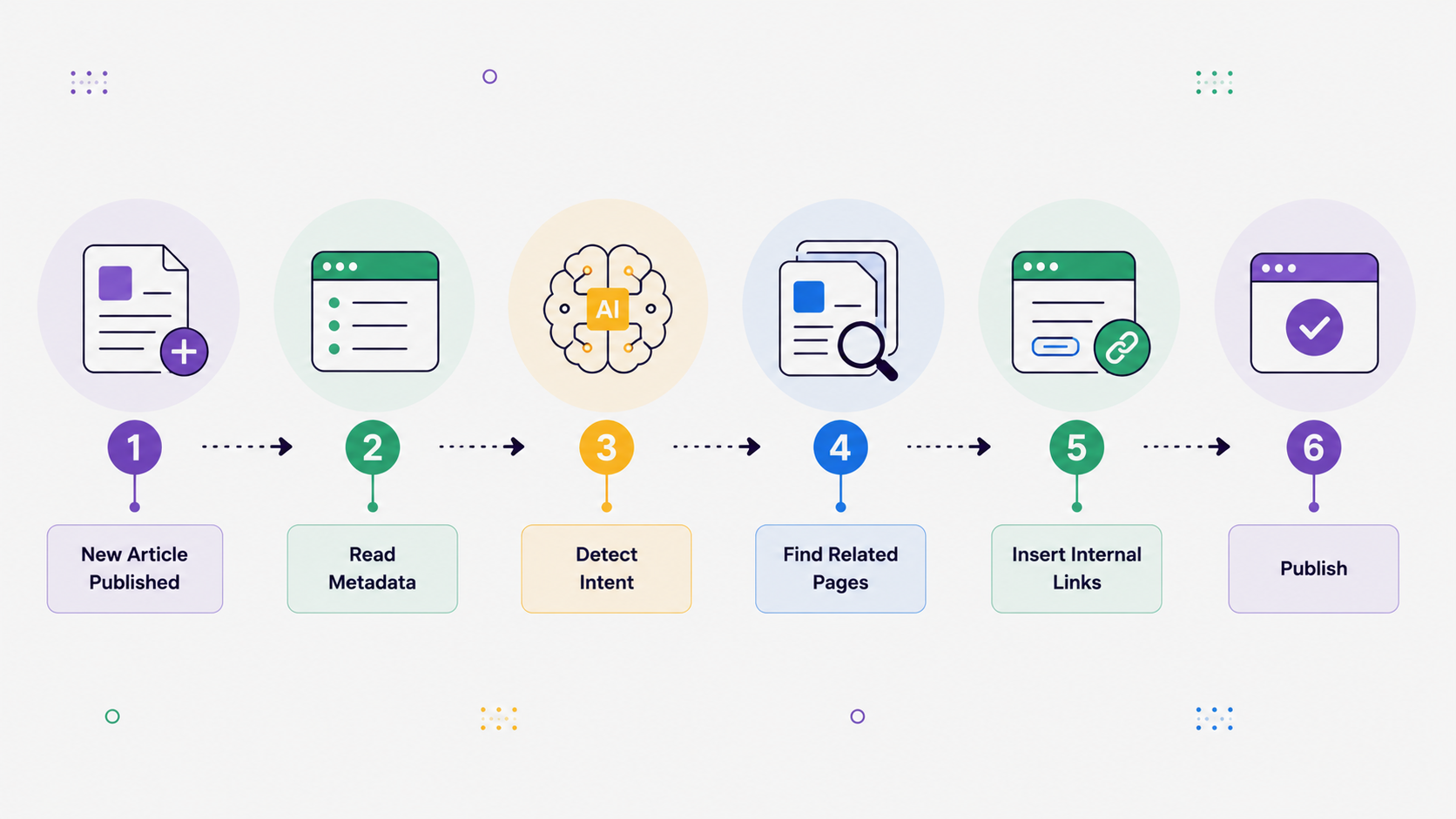
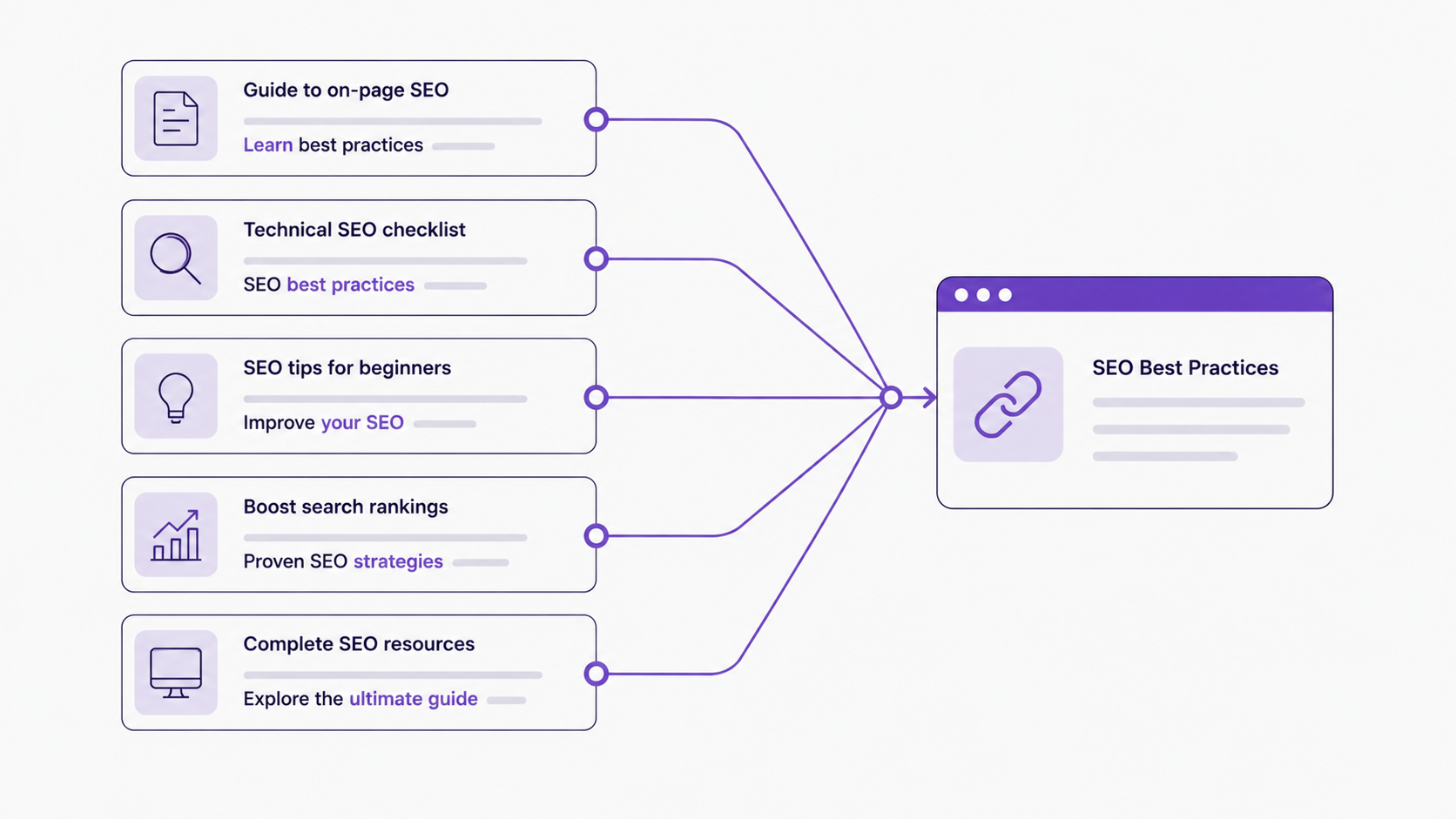
Rule-based internal linking templates are conditional logic statements that automatically generate links when content is published. Instead of manually reviewing each new article to determine what should link to it, you define rules like: “If a page targets informational keywords in the SEO topic cluster, link it to our commercial intent pages on SEO tools.” When new content goes live, the automation platform checks these rules against the page’s metadata and creates links automatically.
The mechanics are elegant and simple. A typical rule might read: IF (keyword = “search intent”) AND (intent = informational) AND (topic = SEO fundamentals), THEN link to [commercial page on SEO tools], [transactional page on SEO software], [informational page on keyword research]. The system evaluates new content against these conditions instantly and inserts links automatically. This approach is far faster than manual linking and far more consistent—every piece of content receives the same linking treatment based on its characteristics, not depending on which team member happened to review it.
Rule-based linking scales beautifully because it removes the manual bottleneck. For a site publishing 20-30 articles per week, manual internal linking becomes a time sink. Even a 5-minute linking task per article adds up to hours per week. Automation removes this friction entirely. More importantly, rules ensure consistency. A human editor might overlook linking one article to a key resource, or forget which pages should connect to each other. The system never will. This consistency strengthens your topical authority signals over time, creating a compound effect.
The real power of templates comes from reusability. Once you define a template for a topic cluster—say, “SEO Automation Content”—you can apply it to dozens of pages. Each new article on SEO automation gets the same set of internal links, reinforcing the topical cluster and building authority more quickly. Templates also reduce decision fatigue. Instead of asking “which pages should this link to?” for every article, you’ve already decided for entire categories of content.
Building Effective Linking Rules
Effective rules balance specificity with flexibility. Too specific, and rules miss content that should be linked. Too broad, and rules create irrelevant links that hurt user experience. Start by identifying your major topic clusters. For a software or SaaS company, this might include “Automation Fundamentals,” “Keyword Research & Intent,” “Content Optimization,” and “Technical SEO.” For each cluster, define 3-5 linking rules that connect content by intent progression and user journey stage.
A strong rule includes three components: (1) A condition based on page metadata (keyword, intent, topic), (2) A list of 2-5 target pages to link to, and (3) Anchor text guidance that reflects the intent transition. For example: “Rule: Pages targeting ‘ecommerce SEO automation’ with commercial intent should link to [product page], [case study], [setup guide] with anchors ‘ecommerce SEO platform,’ ‘ecommerce automation results,’ and ‘get started with automation.’” This specificity ensures links serve user needs at each stage.
Test your rules on existing content first before deploying broadly. Publish a few test articles and let the automation run. Review every link generated—does it make sense in context? Does the anchor text accurately describe the target page? Is the link placed naturally in the text, or does it feel forced? Refine your rules based on what you learn. This iterative approach prevents poor linking decisions from scaling across your entire content library.
You should also consider link placement within paragraphs. A rule might specify: “Only add links to paragraphs containing these keyword variations: [list]” to ensure contextual relevance. This prevents links from appearing in unrelated sections, which hurts both user experience and appears manipulative to search engines. Some automation platforms allow you to exclude certain paragraphs—like callouts, quoted text, or bullet lists—from automatic linking, which helps maintain quality and readability.
Why Is Publish-Time Linking More Effective Than Retroactive Linking?
Publish-time linking—automating internal links the moment content goes live—is fundamentally more effective than waiting to link content later. When linking is automatic, it happens consistently every single time. If you wait to link content retroactively, the task gets deprioritized. Something else always feels more urgent. In our experience, retroactively-linked content either gets missed entirely or receives fewer links than newly published content, significantly weakening topical authority signals over time.
Publish-time linking also captures search engine crawl cycles more effectively. Google crawls and indexes new content quickly, especially for established sites with regular publishing. If internal links are added within minutes of publication, they’re discovered during that initial crawl, signaling topical relationships immediately to the search engine. Retroactive linking, added days or weeks later, takes considerably longer for search engines to discover and associate with the original content’s initial indexing. For competitive keywords, this timing difference can absolutely matter in ranking outcomes.
From a user experience perspective, publish-time linking ensures consistency in navigation patterns. Every new article in a topic cluster has the same internal linking structure, creating a predictable, reliable navigation experience for readers. This consistency builds user trust and encourages deeper browsing across your site. Retroactive linking often results in inconsistent patterns—some articles have many internal links, others have few, depending on who linked them and when. Users notice this inconsistency, and it undermines the sense of a cohesive knowledge base.
Automation platforms that integrate with your CMS—whether WordPress, HubSpot, Contentful, or another system—can trigger linking rules immediately upon publishing. An article goes live, the platform evaluates it against your rules within seconds, and links are inserted before the page even appears in search results. This is far more reliable than a manual process dependent on human memory, time management, and available attention.
When to Use Publish-Time vs. Batch Linking
Publish-time linking works best for high-volume, consistent publishing. If you publish 5+ articles per week in a specific topic area, automation at publish time creates reliable topical authority growth systematically. Batch linking—revisiting 50 older articles to add new internal links—is invaluable for backfilling your existing content. After establishing your intent framework and rules, run a batch linking campaign on your existing content library to apply rules retroactively. This gives your entire site the benefit of structured internal linking, not just new content going forward.
The ideal approach combines both strategies: publish-time automation for ongoing content, batch campaigns for existing content. This hybrid strategy strengthens your entire site’s topical authority while ensuring every new article reinforces your topic clusters. Start with batch linking your top 100-200 performing articles, then maintain momentum with publish-time automation for all new content.
How Do You Classify Keywords and Content by Intent?
Classifying content and keywords by intent requires understanding the four primary intent types: informational (users seeking knowledge), commercial (users comparing solutions), transactional (users ready to buy), and navigational (users looking for a specific site or page). For internal linking automation, you’ll typically work with the first three most heavily, though navigational intent matters for brand-related content.
Start with your keyword research data. If you’re using Moz Pro, SEMrush, or similar tools, they often include intent tags built in. Cross-reference this tagging with your own search results analysis—look at the top-ranking pages for each keyword. If the top results are blog articles and how-to guides, the keyword is likely informational. If they’re product pages and comparison articles, it’s commercial. If they’re pricing pages and signup pages, it’s transactional. This quick heuristic is surprisingly accurate for most keywords and takes just minutes per batch.
For your own content, classify based on the primary value it provides to readers. An article titled “Understanding Keyword Intent” is informational—it teaches a concept. An article titled “Best SEO Automation Tools” is commercial—it helps readers choose a solution. A page offering a free trial or displaying pricing information is transactional. A comparison article like “Yoast SEO vs. Yoast SEO Premium” is commercial, helping readers evaluate options within a brand ecosystem.
Create a classification spreadsheet as your reference document. Include columns for: URL, primary keyword, intent classification, topic cluster, target audience segment (beginner/intermediate/advanced), and publish date. For large sites, this becomes your intent roadmap. Without it, your automation rules will lack precision and consistency. Keep this spreadsheet updated as new content is published.
Building a Content Classification System
For ongoing accuracy and consistency, assign intent classifications to new content during the editorial planning phase, not after publication. When your team pitches an article concept, include the keyword, intent classification, and intended topic cluster in the editorial brief. This ensures that content is written with intent in mind from the beginning, making internal linking far easier downstream. When writers and editors think about intent before writing, the content naturally fits into topic clusters, and your automation rules work much more effectively.
Consider using custom fields in your CMS to store intent classification as structured data. In WordPress, this might be a custom taxonomy called “Intent Type.” In HubSpot, use a custom property to track intent classification alongside other metadata. When automation rules evaluate new content, they can read these fields directly, making rule matching fast and accurate. Without structured data in your CMS, the system has to infer intent from content analysis, which is slower and less reliable.
Establish clear naming conventions for intent types to avoid confusion. Use: Informational, Commercial, Transactional, and Navigational consistently across your team. Some organizations add sub-categories like “Commercial Awareness” (broad comparisons) vs. “Commercial Consideration” (specific product comparisons). The more consistent your classification system, the more effective your automation rules become.
What Tools and Platforms Enable Automated Internal Linking?
Several categories of tools can automate internal linking effectively, from purpose-built SEO platforms to custom solutions. Understanding your options helps you choose the right approach for your site’s scale and complexity. The right tool depends on your publishing volume, technical resources, and budget constraints.
Purpose-built SEO platforms like Yoast SEO Premium and Moz Pro offer internal linking suggestions and some automation capabilities. Yoast’s internal linking feature recommends links based on keyword matching, while Moz’s content monitoring tools help identify linking opportunities systematically. These platforms are suitable for smaller sites (under 1,000 pages) with simpler linking strategies. They excel at identifying obvious linking opportunities but lack the rule-based customization needed for sophisticated intent-based strategies that scale across large content libraries.
Enterprise automation platforms and SEO platforms with dedicated internal linking modules—including specialized solutions built for ecommerce SEO automation—offer significantly more control. These systems let you define custom rules, set linking thresholds, control link placement precisely, and integrate with your CMS via APIs or webhooks. They trigger rules automatically at publish time, without manual intervention. For mid-market sites (1,000-10,000 pages), these platforms provide the right balance of sophistication and ease of implementation.
Custom solutions using your CMS’s native automation capabilities offer the most control but require technical resources and ongoing maintenance. You can build rules using WordPress hooks, HubSpot workflows, Zapier, or your platform’s API. This approach is best for large sites (10,000+ pages) where the investment in custom automation pays off quickly through labor savings and precision linking. Custom solutions also provide the flexibility to implement very specific business logic.
Regardless of tool choice, ensure the platform supports: (1) Rule-based logic for conditional triggering, (2) Intent or keyword-based filtering of content, (3) Publish-time automation triggering, (4) Link placement customization within content, and (5) Audit trails showing which rules created which links. Without these features, automation becomes unreliable and difficult to troubleshoot.
Evaluating Automation Platform Fit
When selecting a tool, test it thoroughly on a small content set first. Set up 3-5 representative rules, publish 10-15 test articles, and review every link generated. Are they relevant and contextual? Does the anchor text accurately describe the target page? Is the link placed naturally within the paragraph, or does it feel forced and disruptive? If the tool struggles with this small test, it will struggle at scale. Most vendors offer trial periods (typically 14-30 days), and you should use this time to evaluate thoroughly before committing.
Consider integration effort carefully. Does the tool connect directly to your CMS with zero configuration, or do you need to build custom integration? Do you need technical staff to set it up, or can your marketing team handle implementation? Easier integration means faster implementation and lower total cost of ownership. For most organizations, a platform that integrates seamlessly with your existing CMS (WordPress, HubSpot, Contentful, Drupal, etc.) is worth a premium over custom solutions, because integration headaches often derail implementation entirely.
Also evaluate reporting and analytics capabilities. Can you see which rules are working and which underperform? Can the platform show you which internal links drive traffic? Can you generate reports on link quality and consistency? These insights are essential for ongoing optimization.
How Do You Design Link Placement Rules Without Creating Keyword Stuffing?
One of the biggest risks of automating internal linking is creating over-linked, keyword-stuffed content that looks manipulative to both users and search engines. Well-designed placement rules prevent this problem by limiting link quantity, controlling placement locations, and varying anchor text naturally. This is critical for maintaining content quality and search credibility.
First, set strict link quantity limits that scale with content length. A rule might state: “Add a maximum of 3 internal links per article of 1,000-1,500 words.” For longer content (2,000+ words), you might allow 4-5 links total. These limits ensure content remains readable and links feel valuable rather than forced. Set quantity limits per rule—don’t let multiple rules add unlimited links to the same page. The automation platform should track how many links have already been added before evaluating subsequent rules, preventing the cascade of over-linking that occurs when rules stack.
Second, define anchor text guidelines that vary naturally. Instead of using the exact keyword every time (which triggers keyword stuffing detection), rotate your anchor text. A rule might specify: “For links to the SEO Automation Fundamentals page, use these anchors: ‘SEO automation,’ ‘automation platform,’ ‘automate your content,’ ‘content automation strategy,’ ‘automation best practices.’” By rotating anchors, you maintain keyword relevance while avoiding the mechanical, repetitive feel that search engines penalize. This approach is more natural to human readers as well.
Third, implement contextual placement rules that ensure links feel natural. Links should only appear in paragraphs where they genuinely serve the reader. A rule might state: “Only add links to paragraphs containing these keyword variations: [list]” to ensure contextual relevance. This prevents links from appearing in unrelated sections, which is both user-hostile and a red flag for search engines. Some platforms allow you to exclude certain paragraph types (callouts, quoted text, lists, code blocks) from automatic linking, which helps maintain content quality and readability significantly.
Fourth, use deep linking thoughtfully. Instead of always linking to homepage or main category pages, link to specific content pages that match what the reader needs at that moment. This is more helpful to readers and distributes link equity more effectively throughout your site. If a user is reading an informational article, they want links to other informational content, not a product landing page that disrupts their learning journey.
Testing for Over-Linking Risk
Before scaling automation to your entire site, run a quality audit on test content. Use readability tools and manual review to ensure automated links enhance rather than interrupt user experience. Ask team members outside your content team to read automated content and provide honest feedback. If they notice the linking seems excessive or awkward, refine your rules immediately before rolling out broadly.
Monitor your search rankings and user metrics carefully after launching internal linking automation. If you see ranking drops for automated content, your linking may be too aggressive. If bounce rates spike on automated content, users may find the content over-linked or pushy. Use these signals to adjust rules quickly. Automation is not a “set and forget” strategy—review results regularly and optimize continuously based on performance data.
Consider implementing a quality score for automated links. Review a random sample of 20-30 automated links monthly and rate each on a 1-5 scale for relevance and placement quality. If your average score drops below 4, adjust your rules before publishing more content through those rules. This systematic quality monitoring prevents drift over time.
What’s the Difference Between Commercial Search Intent and Informational Content Linking?
Understanding how commercial search intent differs from informational intent is absolutely crucial for designing effective internal linking rules, because the linking strategy for each is fundamentally different and serves different user journey stages.
Informational content serves users seeking knowledge or solutions to problems. Articles on “understanding keyword intent,” “how to prove SEO ROI,” or “SEO automation best practices” are clearly informational. The linking strategy for informational content focuses on deepening knowledge and building topic mastery: connect related informational articles to create topic clusters, link to foundational concepts the reader might not understand, and link to slightly more advanced content for readers ready to progress. For example, an article on “commercial search intent” might link to “understanding keyword intent” (foundational knowledge) and “satisfying search intent in your content” (advancement path). The goal is keeping readers engaged in learning and building expertise.
Commercial content helps users evaluate solutions or make purchase decisions. Articles like “best SEO automation tools,” “Yoast SEO vs. Yoast SEO Premium,” or “top keyword research tools” are commercial. The linking strategy for commercial content is fundamentally different: link to informational content that justifies the need for the solution (“why you need SEO automation”), link to comparison content (side-by-side evaluations), and link to case studies or ROI content that supports the buying decision. You’re helping readers move from awareness (“what is this?”) to consideration (“which option is best?”) to decision (“should I invest?”).
The key difference is directionality and user intent stage. When linking from informational content, you primarily link to other informational content, with occasional bridges to commercial content when it makes sense (e.g., an article on “how to do SEO” might link to “best SEO tools” to help readers implement concepts). When linking from commercial content, you actively pull readers back to informational content to justify the product category, then forward to more commercial content to support purchase decisions.
This distinction matters significantly for topical authority. Informational content clusters build your authority as a knowledge source and educator. Commercial content clusters build your authority as a trusted advisor or vendor. Both are valuable and necessary, but they serve different purposes in your content strategy and require different linking approaches to be effective.
Designing Intent-Specific Linking Rules
Create separate rule sets for informational and commercial content to ensure your automation strategy accounts for user intent at every stage. A rule for informational content might be: “Articles targeting ‘keyword intent’ and similar keywords should link to 2-3 related informational articles on intent concepts and 1 commercial article on SEO tools that help with intent analysis.” A rule for commercial content might be: “Articles comparing SEO tools should link to 2-3 informational articles justifying the tool category and 2 case study or pricing pages supporting the purchase decision.”
This segmented approach ensures your automation strategy guides users logically through their journey. You’re not just creating links for SEO signals—you’re strategically guiding users through awareness, consideration, and decision stages. The more aligned your internal linking is with user intent and journey stage, the higher your conversion rates and user satisfaction will be.
Test your intent-specific rules thoroughly before scaling. Publish 5 informational articles and 5 commercial articles through your automated rules, then review how readers navigate between them. Are informational articles driving traffic to commercial pages when appropriate? Are commercial pages directing readers back to informational content when needed? Analytics will reveal whether your intent-specific strategy is working effectively.
How Can You Audit and Maintain Automated Internal Links Over Time?
Automation doesn’t eliminate the need for ongoing oversight and quality assurance. Automated links require regular auditing to ensure they remain relevant, functional, and aligned with your evolving content and business strategy. Without ongoing maintenance, your automation strategy degrades over time as content changes, pages are deleted, and priorities shift.
First, audit link quality quarterly using a systematic process. Pull a random sample of 20-30 articles published through your automation in the last month. Review every internal link carefully: Does it make sense in context? Does the anchor text accurately describe the target page? Is the link placed naturally in the text, or does it feel forced? Use a simple scorecard (1-5 scale) to rate link quality objectively. If your average score drops below 4, adjust your rules before publishing more content through the current ruleset. This quarterly review catches rule drift before it affects too many articles.
Second, monitor for broken links and redirect issues systematically. When target pages are deleted, moved, or merged, automated links become broken, harming user experience and search engine crawlability. Implement a regular crawl using tools like Moz Pro, Screaming Frog, or similar crawlers to identify broken internal links at least monthly. When you find broken links, update your rules to point to new target pages or remove rules that reference deleted content. For sites with thousands of pages, this automated monitoring becomes critical maintenance work that prevents compound problems.
Third, review rule effectiveness quarterly using analytics data. Are your rules creating links that improve user engagement? Does your analytics show that pages created through automated linking receive more internal traffic than manually-linked pages? Are users clicking the internal links, or are they ignoring them? Use this performance data to validate whether automation is achieving its goals. If certain rules consistently underperform, retire them or redesign them based on what the data reveals.
Fourth, adapt rules as your content strategy evolves continuously. As you publish new content, pivot topic focus, or change business priorities, update your rules to reflect new realities. If you decide to move away from a topic cluster, retire rules associated with that cluster. If you launch a new product line or service, create new rules that link to related content. Rules are not permanent fixtures—they should evolve alongside your strategy and market position.
Setting Up Monitoring and Alerts
Implement automated monitoring where your platform supports it. Many automation platforms can send alerts when rules fail, when target pages are deleted, when linking patterns change unexpectedly, or when quality scores drop. Subscribe to these alerts and assign someone to review them weekly. This is far more efficient than manual audits and catches problems quickly before they affect many articles.
Keep a detailed changelog of all rule updates. When you create a new rule, modify an existing one, retire a rule, or change rule parameters, document the change, date, and reason. This documentation is invaluable when you need to troubleshoot problems. If you notice a sudden drop in rankings for automated content, your changelog helps you identify whether a recent rule change caused it. This historical record also helps train new team members on your linking strategy.
What Are the Best Practices for Scaling Internal Linking Automation Across Your Site?
Scaling automation from a pilot program to your entire site requires careful planning, phased rollout, and constant monitoring. Many organizations try to automate their entire linking strategy simultaneously and struggle with poor link quality, unexpected side effects, or overwhelming manual review work. A gradual, evidence-based approach works far better and reduces risk significantly.
Start small with your highest-impact opportunity: Create 3-5 rules for your highest-priority topic cluster—likely the area generating the most traffic or revenue. Test these rules on new content for 2-4 weeks, review results carefully, and refine based on what you learn. Once you’re confident in rule quality and consistency, expand to a second cluster. This iterative expansion lets you optimize rules before they affect your entire site’s linking strategy. You should collect success metrics for each phase before expanding.
Second, establish clear success metrics before scaling at all. What does success actually look like for your business? Is it increased internal link clicks and engagement? Better average time on page? Improved rankings for target keywords? Faster crawl budget utilization? Define 2-3 metrics you’ll track, and gather baseline data before launching automation. This gives you clear signals for whether to expand rules or refine them. You’ll also be able to demonstrate ROI to stakeholders with concrete metrics.
Third, create an approval workflow for new rules before they’re live. Even with automation, someone should review new rules and test results before they affect your entire site. A simple approval process—rule creator, marketing lead, SEO specialist sign-off—prevents problematic rules from affecting your entire content library. For large organizations, involve stakeholder groups (product, marketing, content, engineering) in rule design to ensure alignment with broader business objectives.
Fourth, document your rules thoroughly and maintain documentation as a living resource. For each rule, document: purpose (what problem does this solve?), conditions (when does it trigger?), actions (what links does it create?), success metrics (how will we know it works?), and owner (who maintains this rule?). This documentation is invaluable when troubleshooting problems, training new team members, or reviewing rule effectiveness. Keep this documentation updated every time a rule changes.
Fifth, plan for content updates and evolution proactively. As your content library evolves, old rules may reference outdated content. Establish a process for retiring old rules and creating new ones. Every 6 months, review your entire rule library systematically and ask: Are these rules still aligned with our current strategy? Do the target pages still exist and perform well? Should we create new rules for emerging priorities? This prevents technical debt from accumulating.
Avoiding Common Automation Pitfalls
Common implementation mistakes include: (1) Over-aggressive rules that create too many links per article, (2) Rules that link to low-performing or outdated pages, (3) Anchor text that’s too keyword-focused and obviously automated, (4) Inadequate monitoring and quality assurance, and (5) Rules that don’t align with actual user intent. Avoid these by testing thoroughly before scaling, monitoring continuously, and being willing to disable or refine rules that aren’t working.
Another significant pitfall is treating automation as a replacement for strategic thinking. Automation amplifies whatever strategy you implement—good strategy becomes more effective, but bad strategy spreads faster. If your topic clusters are poorly defined or your intent classification is inaccurate, automation will spread these problems across your entire site. Invest significant time in strategy and classification before investing in automation infrastructure.
Finally, avoid the “launch and forget” mentality entirely. Automation requires ongoing attention and refinement. Schedule monthly reviews to check link quality, analyze user metrics, and identify rules that need adjustment. This ongoing attention prevents drift and keeps your automation aligned with evolving business goals.
How Do You Integrate Internal Linking Automation With Your SEO Platform?
Successfully implementing internal linking automation requires integration with your existing SEO platform, content management system, and analytics tools. Without proper integration, automation exists in isolation, severely limiting its effectiveness and creating manual work that defeats the purpose of automation.
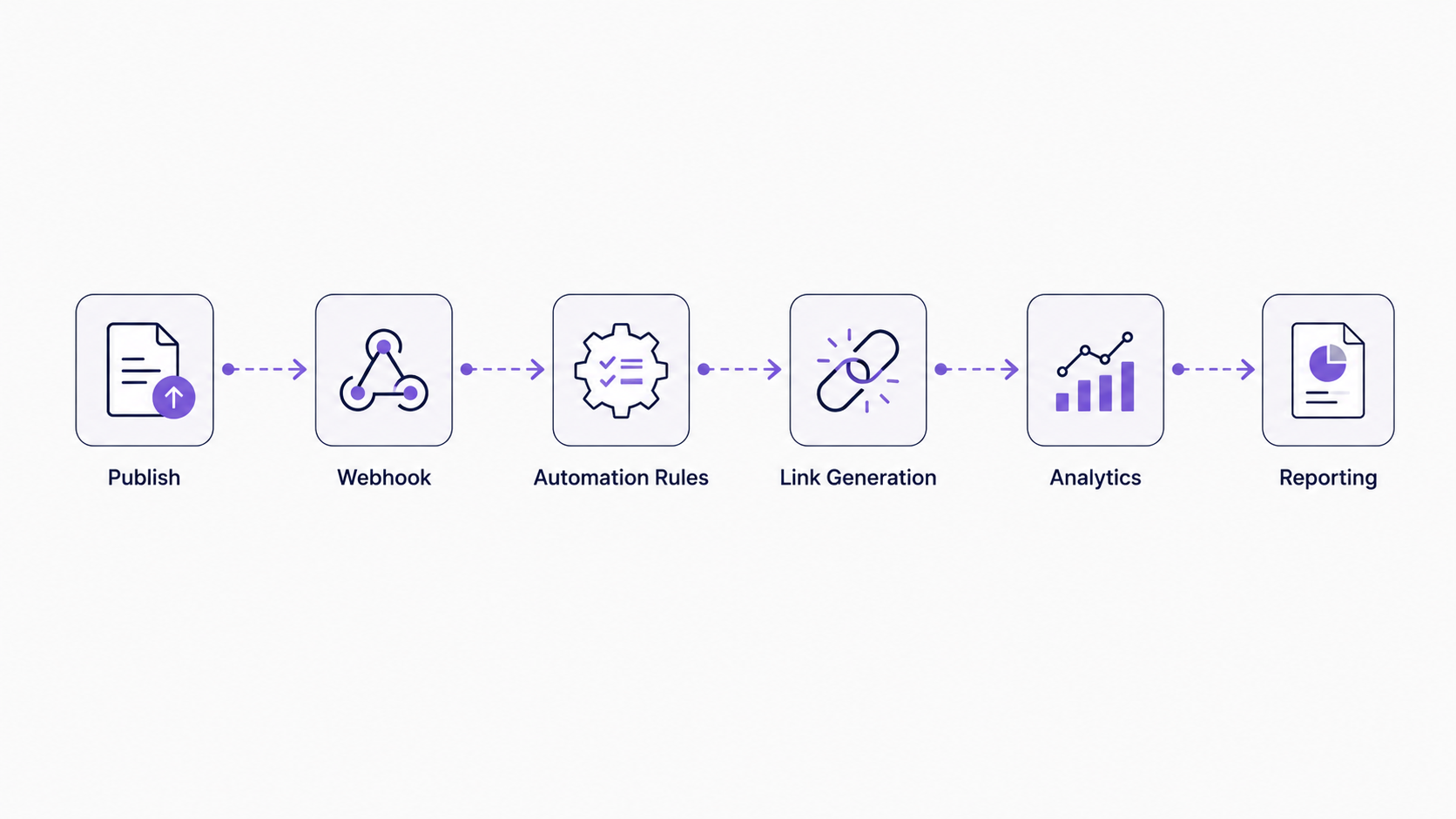
Most modern SEO automation platforms connect to your CMS via webhooks or direct API integration. When you publish an article in WordPress, HubSpot, Contentful, or your platform of choice, a webhook fires data to the SEO automation system, which evaluates the article against your rules and sends back link insertion instructions. The best platforms insert links directly into the published content, requiring zero manual intervention from your team. The integration should be seamless enough that your content team doesn’t need to think about it.
For this integration to work smoothly and reliably, ensure: (1) Your CMS stores relevant metadata (keyword, intent, topic) in accessible fields or custom properties, (2) Your automation platform can read and interpret this metadata accurately, (3) The system can inject HTML links into your content without breaking formatting or structure, and (4) You maintain detailed audit trails showing which rules created which links. These audit trails are essential for troubleshooting and quality assurance.
Integration with analytics is equally important for measuring impact. Your automation platform should connect to Google Analytics or a similar tool to track performance of automated links. Can you see which internal links drive traffic? Which links have low click-through rates or are ignored? This data informs rule optimization directly. If a particular rule consistently underperforms, analytics will reveal it, allowing you to refine or retire the rule.
Integration with your keyword research and content monitoring tools is also valuable. If your keyword tool (Moz, SEMrush, etc.) identifies that certain pages rank for commercial intent keywords, your automation platform could use this signal to improve rule targeting automatically. If your content monitor shows a new competitor targeting a specific topic cluster, you could quickly create rules to strengthen your coverage of that cluster.
Building Your Integration Stack
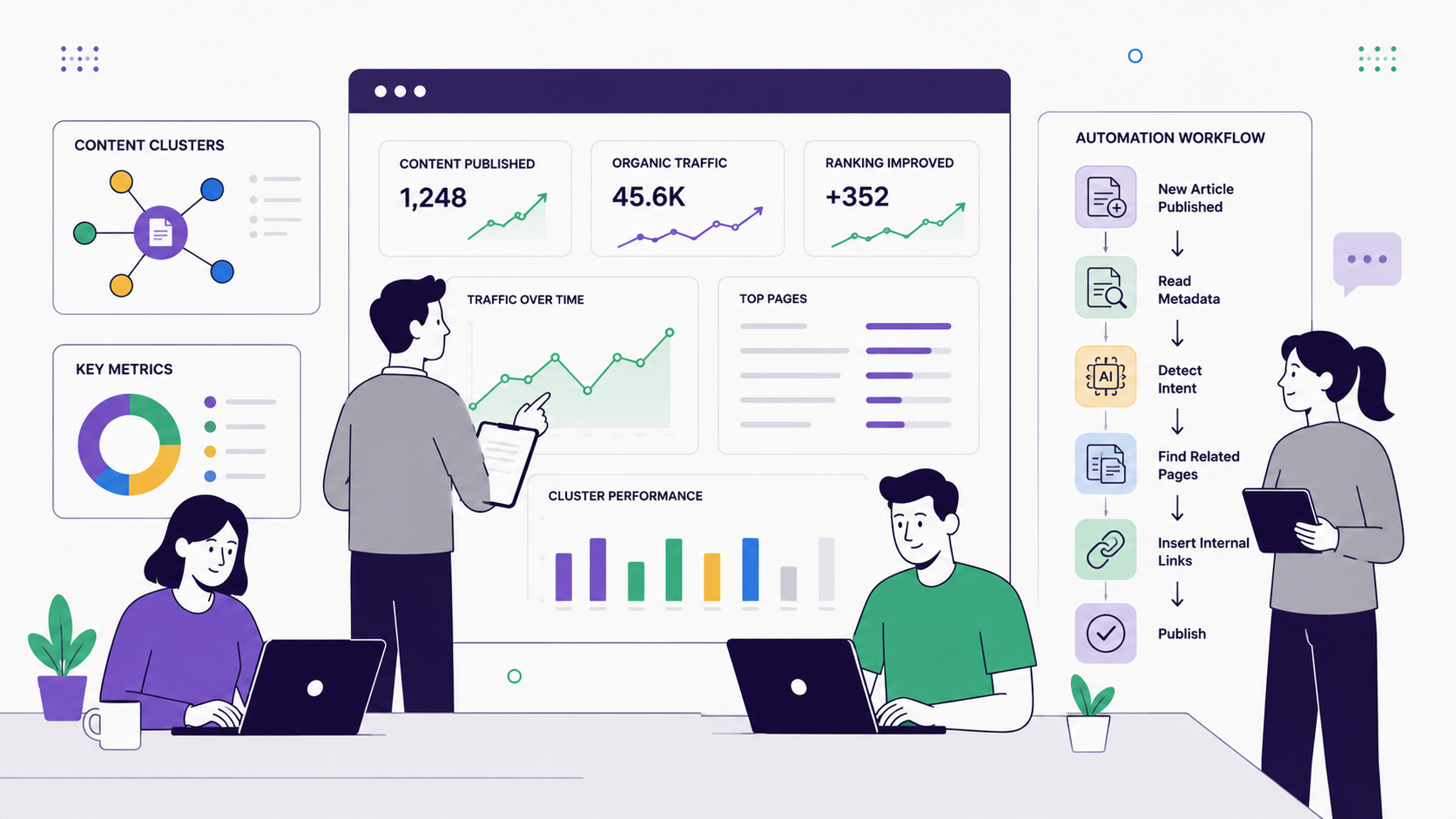
Your ideal tech stack might look like: CMS (WordPress/HubSpot) → Automation Platform → Analytics + Reporting Dashboard. Data flows: CMS publishes content → Automation Platform reads metadata and applies rules → Links are inserted into published content → Analytics tracks link performance and engagement → Reporting dashboard shows results and insights.
For technical teams, building this stack is straightforward using API documentation and webhook standards. Use webhook documentation from your CMS and API documentation from your automation platform. For non-technical teams, choose platforms with pre-built integrations that require minimal setup. The less technical work required, the faster you implement and the more sustainable your automation becomes long-term.
Consider using middleware tools like Zapier or Make to connect systems if direct integration isn’t available. These tools can translate data between systems and trigger automations based on specific events. While middleware adds a layer of complexity, it’s still more reliable than manual processes and can be implemented relatively quickly.
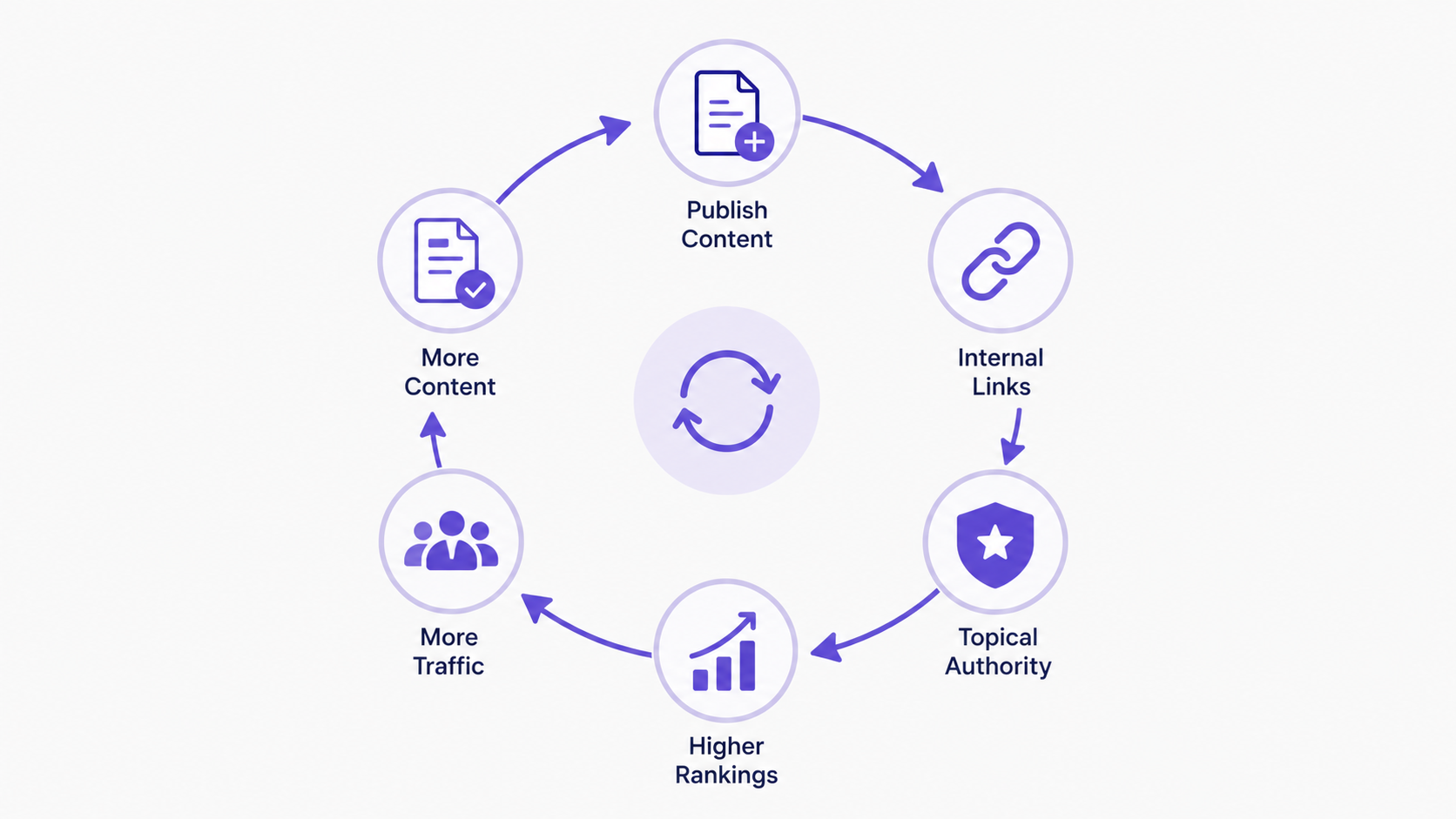
Automating internal linking through search intent mapping and rule-based templates fundamentally transforms how you build topical authority at scale. By classifying your content by user intent and designing rules that connect pages strategically—informational to informational, commercial to commercial, with intentional bridges between them—you create a linked content structure that guides users effectively and signals deep topical expertise to search engines. Publish-time automation ensures every new article contributes to this structure immediately, without manual effort or the risk of human error. The key to success is starting small with well-designed rules, monitoring results carefully, and refining continuously based on performance data. As you scale automation across your site, topical authority grows systematically: each new article reinforces your expertise in its topic cluster, helping your entire site rank better and attract more qualified organic traffic over time. For teams struggling with manual SEO work and optimization bottlenecks, internal linking automation removes a critical constraint, freeing resources to focus on higher-value content strategy and experimentation.
Ready to automate your internal linking strategy? Start by mapping your content by search intent—take one afternoon to classify your top 50 articles. Then define 3-5 rules for your highest-priority topic cluster. Test with publish-time automation on new articles, measure the impact on engagement and rankings, and scale from there. With the right automation platform, you’ll build systematic topical authority that drives consistent organic growth.