
An SEO automation platform reshapes your whole content lifecycle, from the first brainstorm to the final performance report. Rather than juggling separate manual steps across ideation, creation, editorial review, publishing, and analytics, a well-built automated content pipeline for SEO absorbs the repetitive work and leaves your team on strategy and quality.The payoff is blunt. Production time drops 70-80%, and quality and consistency hold.
Three marketers can oversee output that used to need ten, because the automation platform owns the high-volume, routine tasks.
This guide walks through building a repeatable, end-to-end SEO automation pipeline that carries content from concept to publication to measurable results. Managing dozens of pages or thousands, you’ll get the framework that scales organic traffic without scaling your headcount to match.
What Is an End-to-End SEO Automation Pipeline?
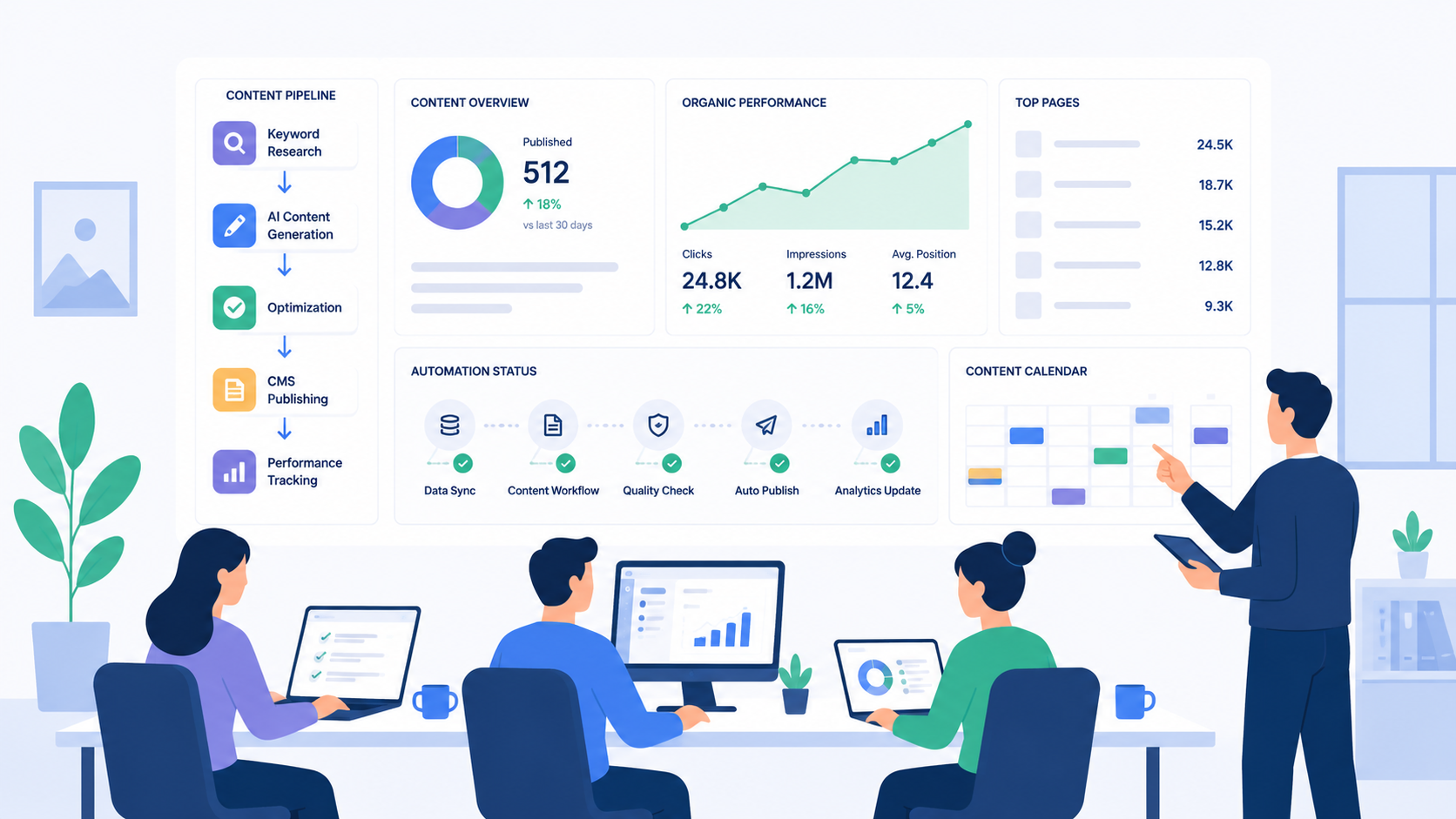
An end-to-end SEO automation platform is one connected workflow that automates the repetitive work across content strategy, creation, optimization, publishing, and performance tracking. No more spreadsheets, email chains, and manual uploads. The platform runs the whole thing from search intent mapping through final KPI measurement, and the silos and human bottlenecks disappear.
Picture a content factory. Set the rules, workflows, and approval gates once, and it runs consistently across hundreds or thousands of pieces with no hands-on work per page. Your team oversees; the system handles the execution details.
The Four Major Phases
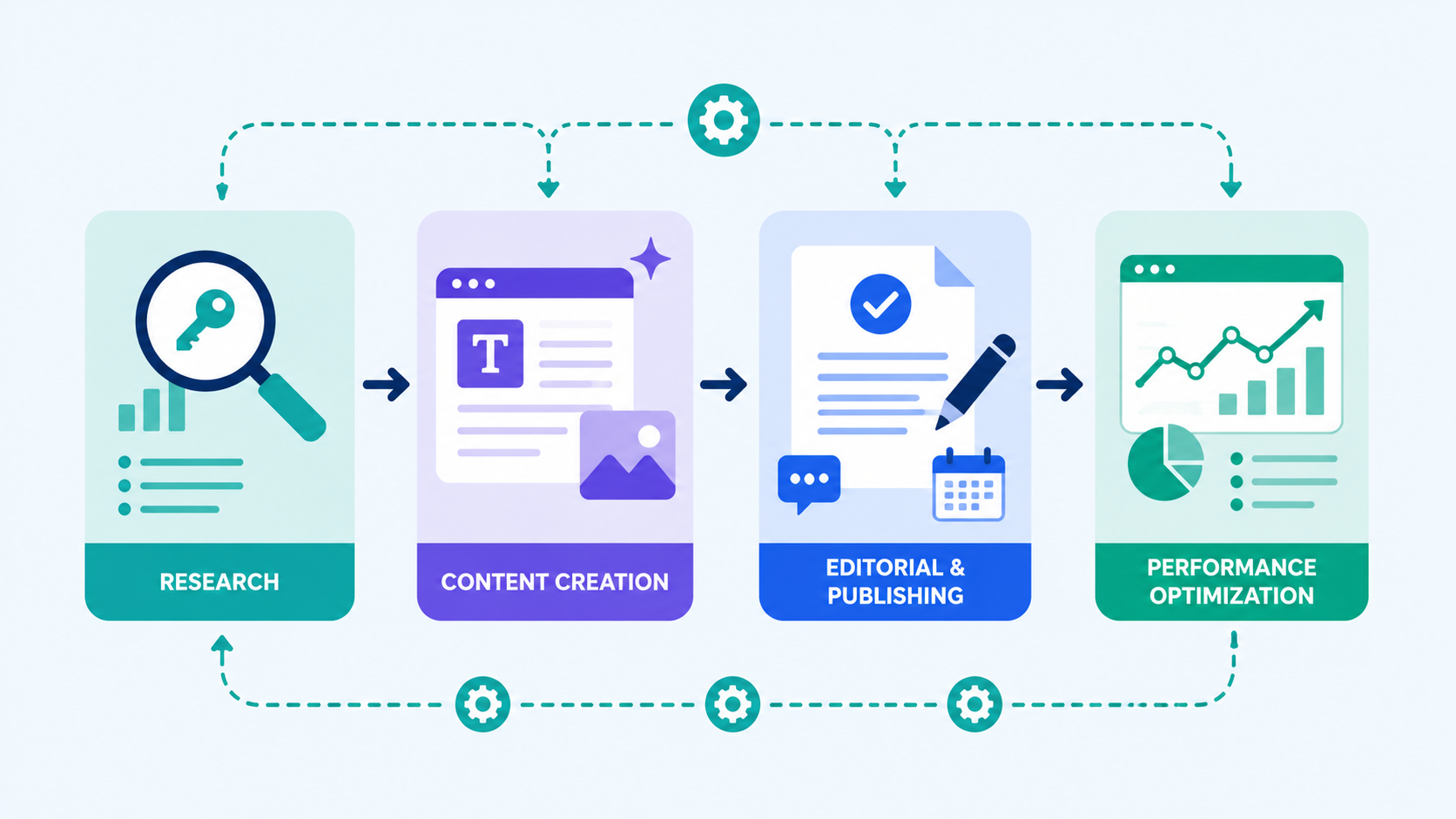
A typical automated content pipeline for SEO runs on four connected phases:
Phase 1: Automated Research and Ideation. Your platform finds high-opportunity keywords by search volume, competition level, and search intent. No guesswork, no editorial gut feel. This phase surfaces data-driven topics by reading your existing rankings, competitor content gaps, and emerging search trends. It ranks topics by forecasted organic traffic, so your resources land where the impact is.
Phase 2: AI-Powered Content Generation. Topic selected, the platform builds a structured content brief that feeds AI generation. Target keywords, semantic variations, outline structure, audience details, your brand guidelines. The AI drafts in minutes what would cost a writer hours or days. That draft already carries proper heading hierarchy, natural keyword placement, and a structure built to rank.
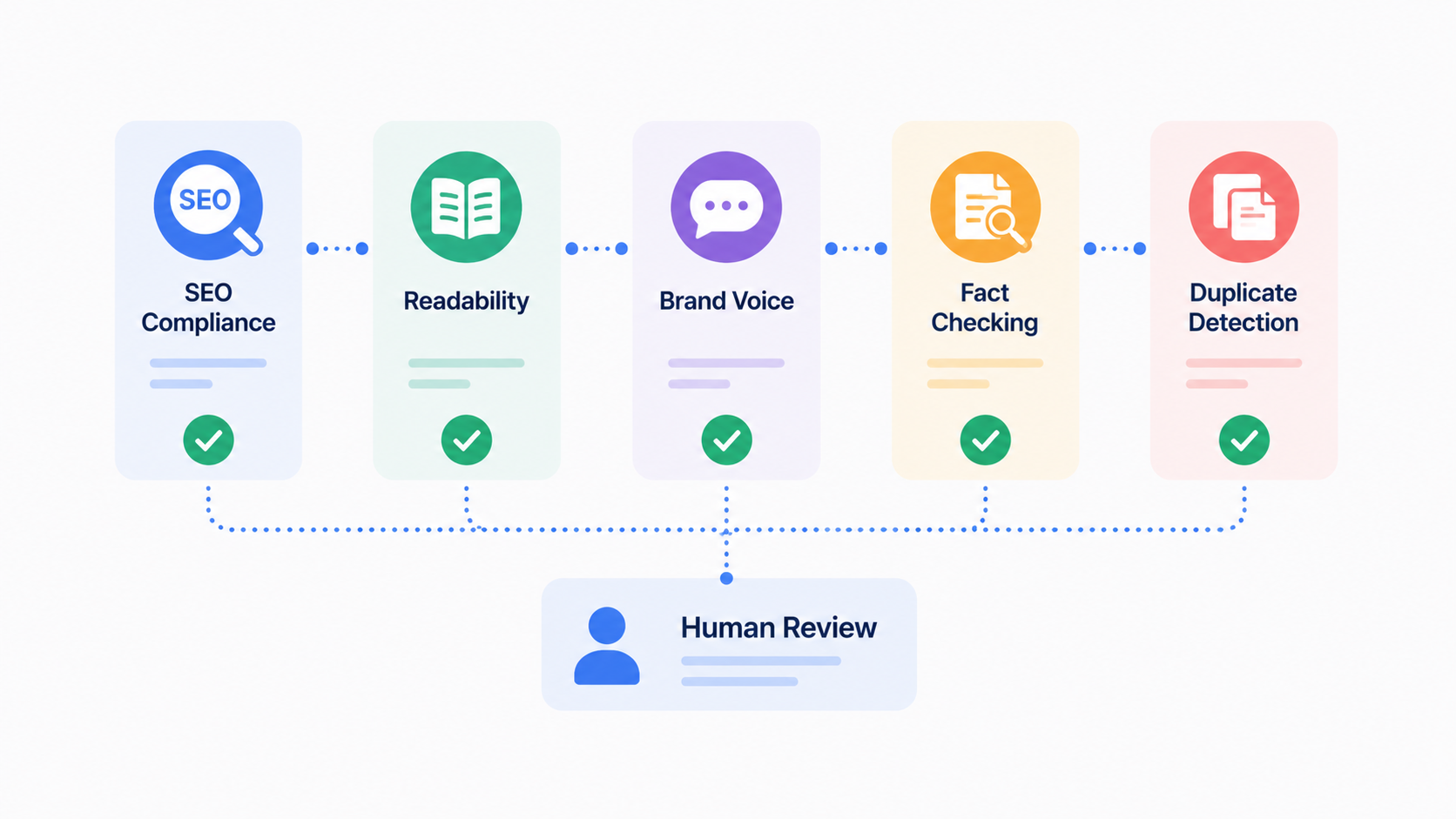
Phase 3: Automated Editorial Workflows. Generated content runs automated quality checks before any human sees it. The platform validates SEO compliance, structural standards, readability, brand voice, and factual accuracy. Whatever clears every automated gate moves to human editorial review, except now your editors polish solid drafts instead of starting cold. After approval, the platform routes it to publishing.
Phase 4: Continuous Performance Monitoring. Once live, the platform tracks performance across Google Search Console, Google Analytics, and ranking data on its own. It measures organic traffic, keyword rankings, conversion rates, and time-to-rank. The important part: it feeds those insights back into ideation, flagging underperformers to refresh, spotting success patterns to repeat, and suggesting related content for adjacent keywords.
How Does the Ideation Phase Work in Automated Pipelines?
Ideation is where it all starts. The platform decides which topics to create off data signals instead of guesswork or editorial preference. Everything downstream depends on this call. Optimize for the wrong topics and the whole pipeline works hard on the wrong things. So let’s look at how automated ideation actually runs and what sets it apart from old-school topic selection.
Search Intent Mapping in Automation
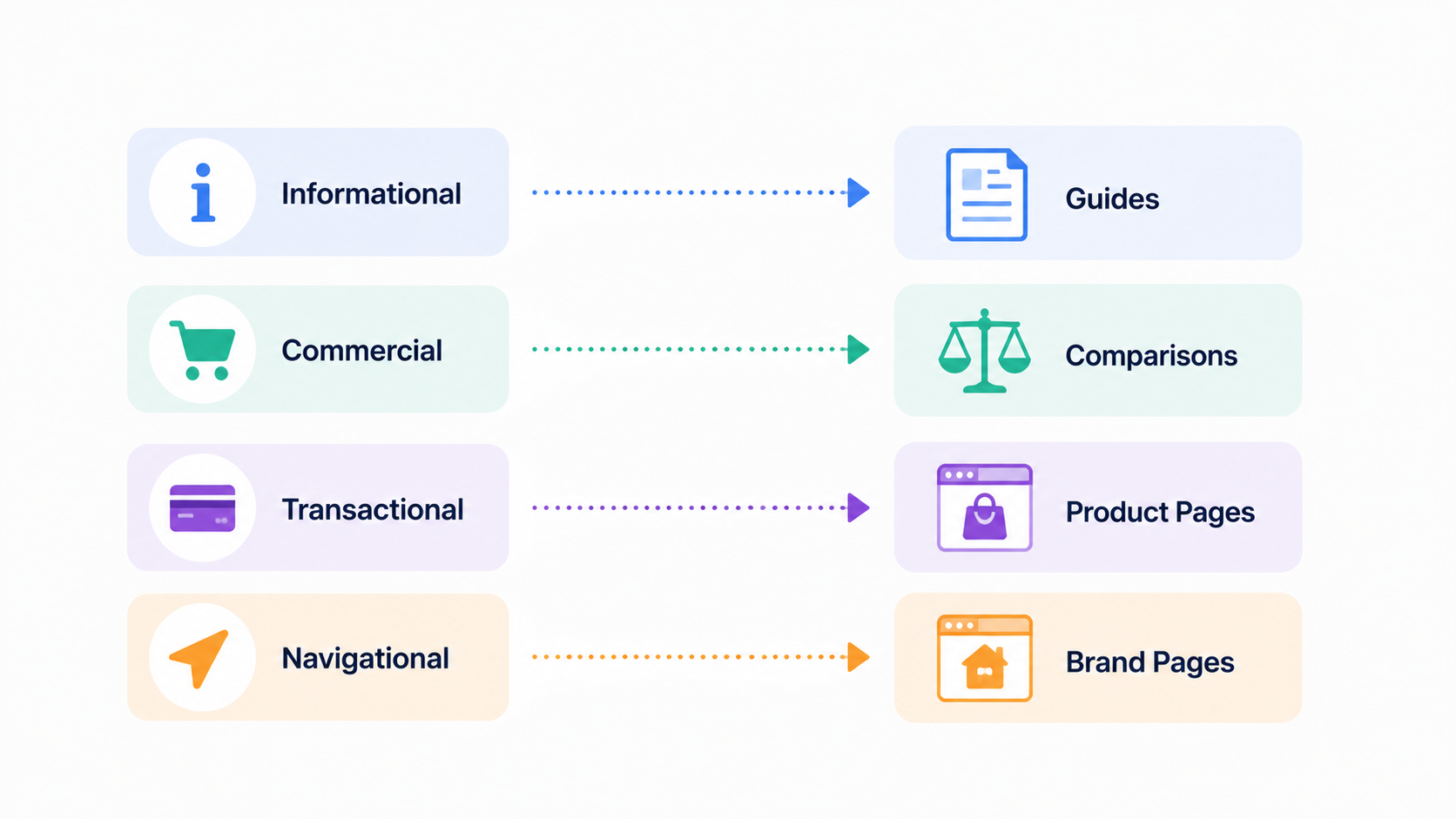
Search intent decides whether the effort pays off, because content built for the wrong intent is wasted. One keyword phrase can carry completely different intent depending on context. “SEO automation” might be someone learning what automation is (informational), comparing platforms (commercial), or ready to buy right now (transactional). Your platform has to read that difference and match the content type to it.
In practice, it splits like this. Informational queries (“how to optimize title tags”) want thorough how-to guides. Comparison queries (“best SEO automation platforms”) want detailed comparisons that help buyers decide. Transactional queries (“buy SEO automation software”) want product pages with pricing and features. The platform should tag each keyword by intent and flag mismatches before anything publishes. Aiming informational content at transactional keywords is like running ads to window shoppers when you need buyers. It burns resources.
The platform reads intent from several signals: Google’s own top 10 (which already reveals the intent Google assigns the query), keyword modifiers (“best,” “how to,” “buy”), searcher behavior (click-through rates to different result types), and your domain expertise. Most platforms score intent probabilistically rather than in a hard yes-or-no, since plenty of queries carry mixed intent.
Data Sources for Topic Identification
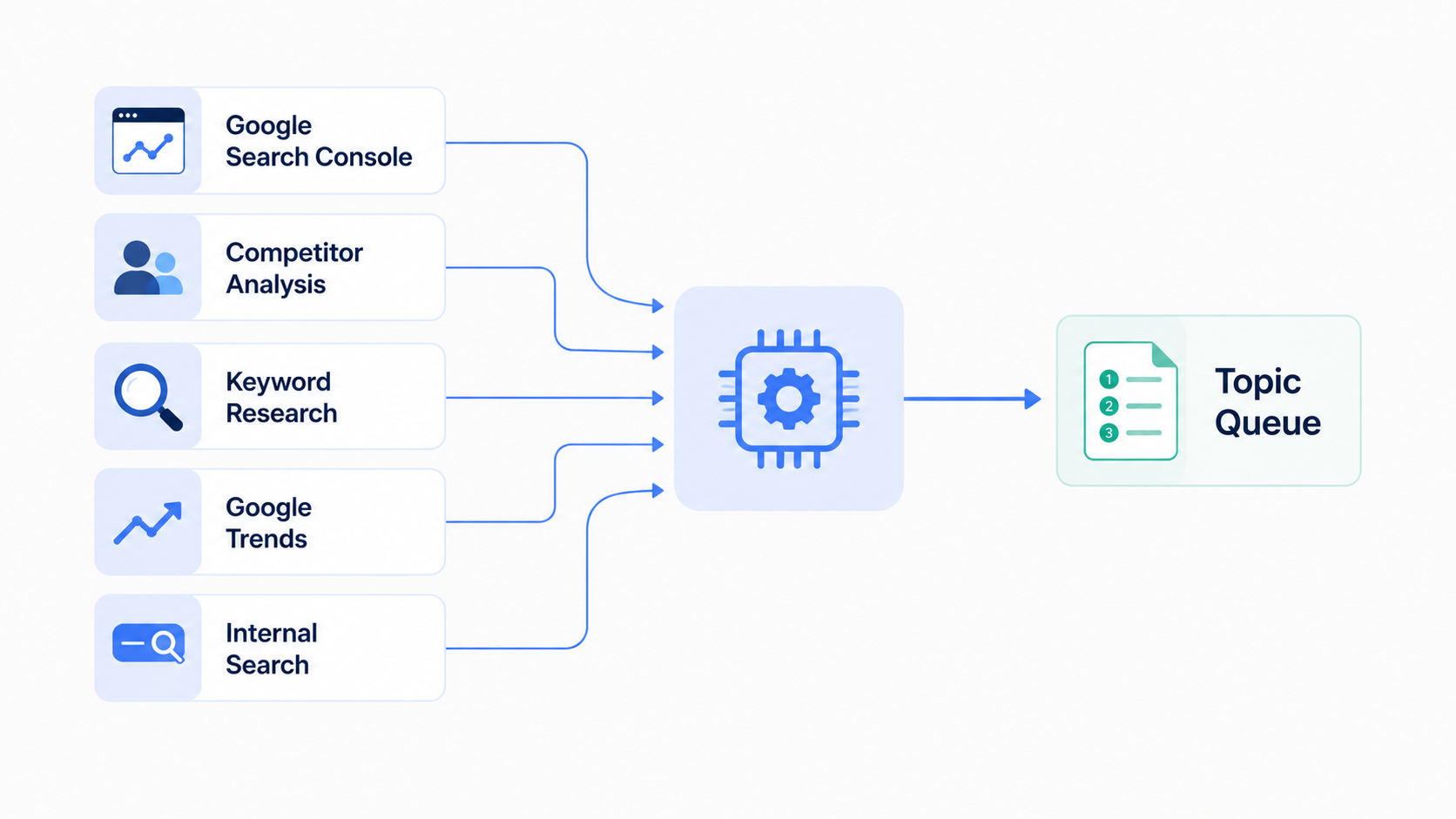
Good automated ideation pulls from more than one data source, not just keyword tools. Each one exposes different openings:
Google Search Console shows the keywords you already rank for but underperform on. Ranking #8 for a keyword pulling 500 monthly searches? That’s an optimization opportunity. Update the piece and you’ll likely climb to position #4-5, adding 40-50% more traffic. Your platform should flag that low-hanging fruit on its own.
Competitor analysis exposes gaps where competitors rank and you don’t. When your top 5 competitors all rank for a keyword and you’re absent, that keyword is valuable in your niche. The platform can scan competitor rankings systematically and name the high-potential keywords you’re missing.
Keyword research feeds surface high-volume, low-competition openings. SEMrush, Ahrefs, and Moz hand you sorted lists by search volume, difficulty, and related intent. Your platform should ingest those feeds and score them against your own criteria.
Search trend data catches emerging topics before they go mainstream. A topic trending 20% month-over-month might be the moment to publish comprehensive content and ride the rising demand. Point your platform at Google Trends and similar services to catch those inflection points.
Internal search logs reveal what visitors actually hunt for on your site. If 500 people a month search “AI-powered content generation” in your site search, that’s a clear signal you need comprehensive content on it ranking in Google. Your platform should read that internal signal and prioritize around it.
The platform folds all these signals into a prioritized topic queue, usually scored on potential organic traffic value against effort to rank. A topic worth 10,000 monthly visits at difficulty 25 beats one worth 1,000 visits at difficulty 80, and the scoring should reflect that.
Automation Workflow for Topic Selection
A typical ideation workflow runs like this. Every week or month, the platform runs keyword discovery across every data source. It finds new openings, rescores existing ones against performance changes, and compiles a topic list. Then it scores each keyword on your criteria: search volume, competition, commercial value, brand relevance, and fit with your content strategy.
Next it assigns topics to content clusters and flags which existing pages could be updated rather than replaced. That heads off topic cannibalization (multiple pages fighting for one keyword) and squeezes more from the domain authority you already hold. Got a page ranking #6 for a keyword? Updating it beats writing something new.
The platform then produces a prioritized content calendar with forecasted organic impact, required effort, and recommended timing. Your editorial team reviews and approves the calendar in bulk, the whole upcoming plan rather than one piece at a time. Batch approval runs far faster than approving topic by topic.
Once approved, the platform passes the calendar to the creation phase and watches progress. This saves weeks of research and keeps topic selection tied to data, not intuition. Better still, it builds a self-replenishing queue. The moment one piece publishes and starts ranking, the platform names the next highest-impact opportunity. Content velocity stays constant without your team forever hunting for the next topic.
And the shift in the room is real. Your marketers stop asking “What should we write about?” and start asking “Should we publish this topic or that one?” A faster decision loop, and a calendar that’s always full and always pointed at business value.

What Role Does AI Play in Content Generation and Optimization?
AI content generation is the engine of a modern automation platform, but it’s no magic trick. It won’t hand you finished, publish-ready articles out of a black box. Treat AI as a productivity multiplier that speeds up creation while your team guards quality, accuracy, and brand fit.
From Brief to Draft in Minutes
Once the platform pulls a topic from the ideation queue, it builds a structured content brief. That brief bridges strategy and creation. It carries the target keyword, search intent analysis, semantic keywords, a recommended outline, target audience details, and your brand voice guidelines.
The platform feeds that brief into an AI model (usually GPT-4 or similar) and drafts in minutes. Something a writer would spend 4-8 hours or several days researching and writing. The draft isn’t perfect. It is surprisingly complete: proper heading hierarchy, natural keyword integration, a section structure built to rank, and internal link opportunities already spotted.
The point worth holding onto: the draft saves your writer time, it doesn’t replace them. Your writer now spends 30-60 minutes editing and refining instead of 4-8 hours writing from scratch. And it compounds. Writers who used to ship 2-3 pieces a month can now review and refine 8-12. Content velocity jumps 3-4x with no new hires.
Quality Control in Automated Generation
Here’s where a lot of platforms fall down. They generate content and skip the quality checks. A solid SEO automation platform runs automated QA that scans generated content across several dimensions:
- Keyword metrics: Verifying primary keyword appears in title, introduction, and 2-3 subheadings at natural density (1.0-1.5%, not keyword-stuffed)
- Readability standards: Ensuring average sentence length stays under 20 words, paragraphs under 4 sentences, and Flesch reading ease falls in target range
- Structure compliance: Confirming proper heading hierarchy (H1 → H2 → H3), sufficient internal link targets, and meta description length between 150-160 characters
- Factual accuracy: Cross-checking claims against source material and flagging unsupported assertions for editor verification
- Brand voice: Using custom natural language processing models to match your established tone, vocabulary, and style preferences
- Duplicate content: Scanning against existing pages to prevent cannibalization and ensure each piece adds unique value
Every check is configurable. Want stricter readability? Set Flesch score targets. Want harder keyword optimization? Adjust density targets. Have specific style rules? Encode them into the QA.
Anything that fails a gate gets flagged and sent back to generation with specific feedback. For instance: “Keyword density is 0.8%, below your target of 1.0%. Please revise introduction and first subheading.” Content that clears every automated gate moves to human editorial review, so your editors only touch pieces that already meet baseline quality. That’s the trick to scaling without quality sliding. Automation runs the mechanical checks, humans run judgment and nuance.
The Optimization Layer
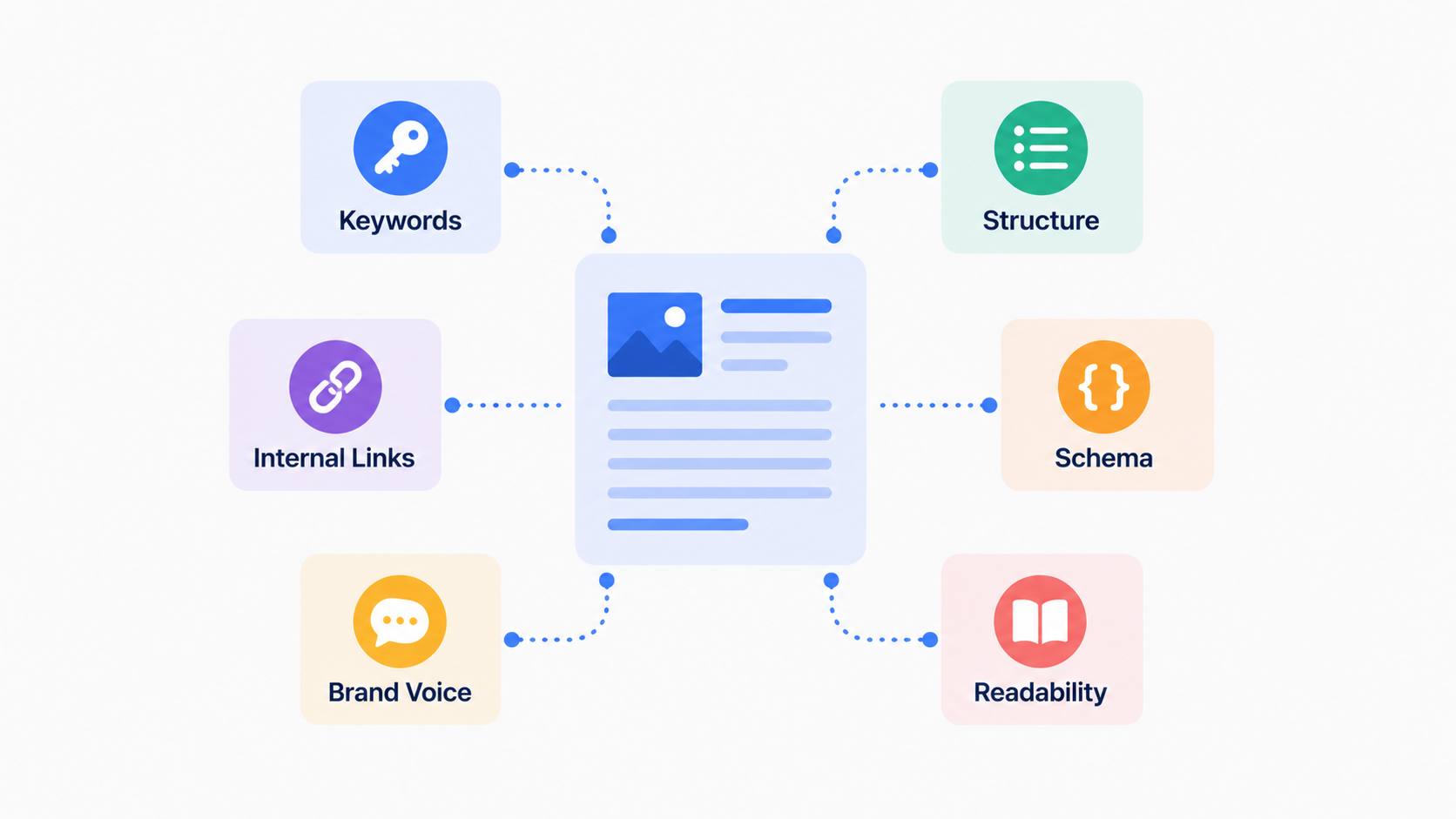
After generation and automated QA, the platform applies optimization rules built for your niche and business model. This layer is where it learns your specific requirements.
Ecommerce sites might get product schema markup inserted, mobile conversion tuning, key product attributes surfaced, and customer reviews woven in. Service businesses might get content localized for different geographic markets, local schema added, or credentials and social proof pushed forward. Informational content might get related questions inserted (chasing featured snippets), a restructure for scanability, or data visualizations added.
None of these are random. They come from the patterns in your top-performing content. The platform reads which pieces drive the most traffic and conversions, finds the common threads, and encodes them into optimization rules. That’s a feedback loop: the platform learns what works for your audience and keeps improving.
The generation phase flips your workflow from “write from scratch” to “refine and optimize.” Your team often finishes this phase in 30 minutes instead of 4 hours. That 7.5-hour saving per piece stacks up fast across dozens of pieces a month.
What Metrics and KPIs Should Drive Your Automation Strategy?
A pipeline is only as good as the metrics it chases. Without clear KPIs, you can automate the wrong work entirely, cranking out content faster while driving no business results. Metric alignment is the line between an automation investment that pays and one that’s wasted.
Primary vs. Secondary KPIs
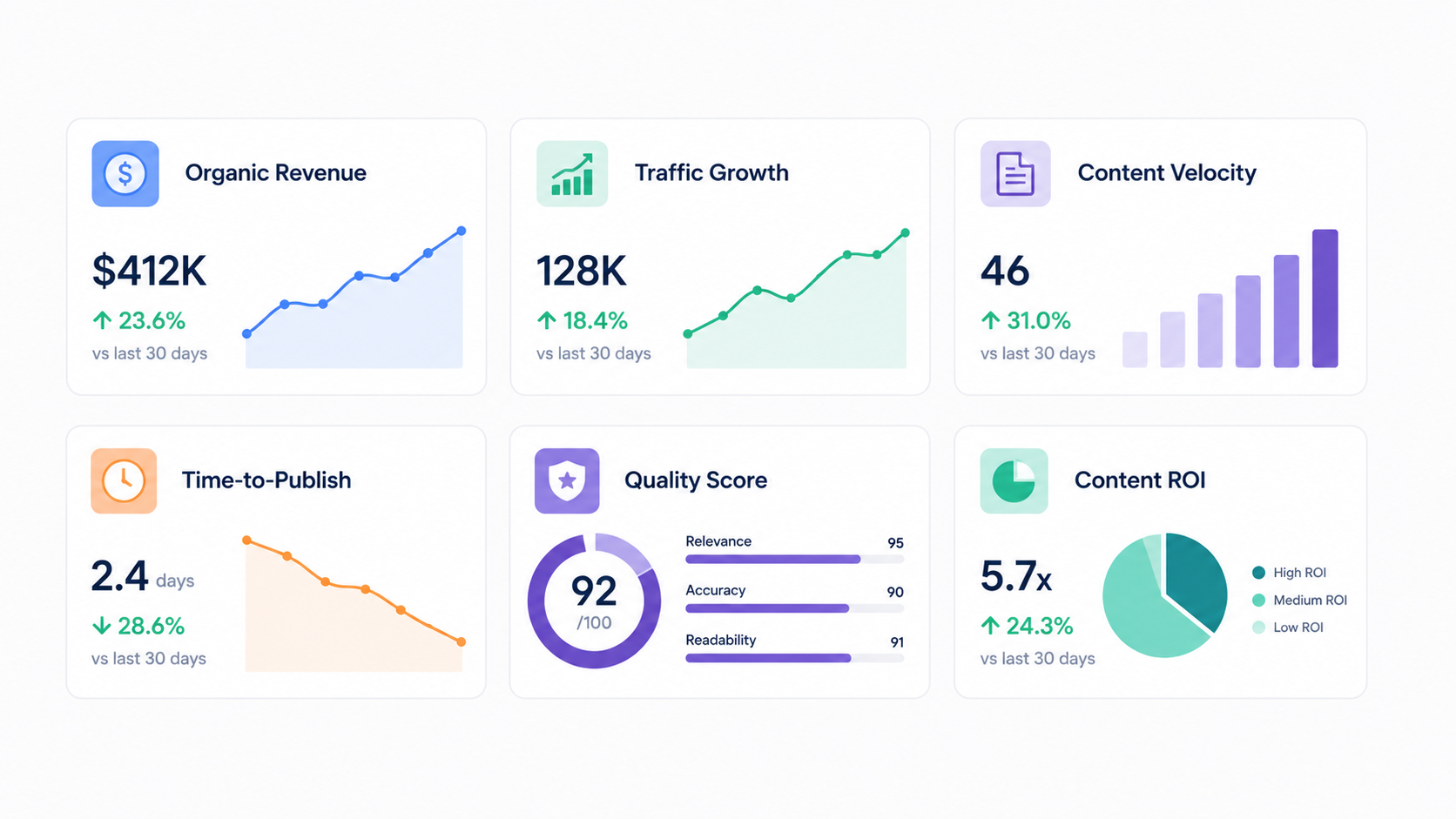
Your primary KPI has to map straight to your business goal. For most companies that’s organic revenue or organic traffic. But traffic that doesn’t convert means nothing, so define what success actually looks like for you:
- Organic revenue: Revenue directly attributed to organic search (most valuable for ecommerce and service businesses)
- Organic conversions: Leads, signups, or other meaningful actions from organic traffic
- Qualified organic traffic: Traffic from keywords with commercial intent (not just any traffic)
- Search visibility: Aggregate ranking position for all target keywords (directional indicator of future revenue)
- Organic traffic growth rate: Month-over-month or year-over-year traffic increase (shows momentum)
The platform should track your chosen primary KPI relentlessly. Every call, which topics to create, which content to update, which keywords to target, runs through that one metric. Primary KPI is organic revenue? The platform prioritizes high-commercial-intent keywords. Brand awareness? It prioritizes high-volume informational keywords. The metric you pick sets the strategy.
Secondary KPIs give you context and read pipeline health:
- Content velocity: How many optimized pieces your platform publishes per week or month (measures productivity)
- Time-to-publish: How long from ideation to live publication (measures pipeline efficiency)
- Content quality score: Automated measurements of readability, SEO compliance, and brand voice (catches quality decay)
- Approval workflow SLA: How long editorial review takes (identifies bottlenecks)
- Publish-to-rank time: How long between publication and achieving target rankings (shows content competitiveness)
- Content ROI: Revenue generated per dollar spent on content creation and optimization (measures investment return)

Track the secondary KPIs weekly, but don’t let them pull focus from the primary. Publishing 50 pieces a month while only 5 drive revenue means your ideation strategy is broken. Raw velocity is worthless if the content doesn’t deliver.
Setting Realistic Baselines and Expectations
Before you automate, set baselines for these metrics against your current manual process. How much organic traffic do you drive today? How many pieces ship monthly? What’s your average time-to-publish? Baselines are how you tell whether automation actually improved performance or just made things feel quicker.
Realistic numbers for a well-built pipeline usually land here:
- Content velocity increase: 3-5x more published content with similar resources (you publish 3-5 times more pieces with your existing team)
- Time-to-publish reduction: 60-70% faster (from 2 weeks to 3-5 days from ideation to publication)
- Content consistency improvement: 80%+ improvement in SEO compliance (automated QA catches issues manual review misses)
- Organic traffic growth: 25-50% traffic increase within 6 months (from increased publication frequency and improved quality)
These are averages. Your real results ride on your niche, competition, domain authority, and how good your strategy is. A competitive niche packed with high-authority rivals ranks slower. An underserved niche with weak competition moves faster. The point is realistic expectations, not overnight miracles.
Set your baselines before you implement, then measure again at 3 months and 6 months. That’s your proof the investment is paying off. Publishing 3x more content after 6 months but only 10% more organic revenue? Your ideation strategy needs work. Publishing 3x more and driving 40% more revenue? The automation is clearly earning its keep.
How Do You Handle Ecommerce SEO Automation at Scale?
Ecommerce throws automation challenges that generic content pipelines choke on. Thousands of product pages, constant inventory changes, time-sensitive pricing updates, and enormous keyword opportunities. A standard pipeline breaks at ecommerce scale and needs approaches tailored to the terrain.
Product Page Template Automation
Rather than treating each product page as its own writing project, ecommerce platforms lean on intelligent template-based generation. You define template structures that hold consistency and still leave room to customize:
A typical ecommerce template carries a product intro highlighting key differentiators, a detailed specifications table, a features and benefits section, a competitive positioning or comparison section, an FAQ hitting common questions, and user reviews or social proof. The platform writes the body copy that fills each section, customizing to the specific product while keeping structure and quality consistent.
Here’s the part that matters. Ecommerce SEO automation at scale needs keyword targeting logic baked into the templates. The platform should identify the primary keyword for each product on its own (usually product name plus category, like “waterproof hiking boots”). It researches secondary keywords tied to attributes (“lightweight,” “breathable,” “durable”) and use cases (“for women,” “for winter,” “for backcountry”).
Then it works those keywords naturally into the template sections. The intro carries primary and secondary keywords. The features section covers attribute keywords. The FAQ targets long-tail keyword questions. What comes out is comprehensive, keyword-optimized content that reads unique but follows a consistent structure.
Template automation drops product page creation from hours per page (writing unique content each time) to minutes (template plus keyword customization). For a store with 5,000 products, that’s 500 hours of writing against 150. A 3x productivity gain.
Category Page Strategy and Automation
Product pages are only half the ecommerce SEO story. Category pages targeting high-volume keywords like “best [product type]” or “[product type] for [use case]” often pull more organic traffic than individual products. Your platform should handle category pages differently, with their own workflows:
Dynamic content assembly pulls current product data so category intros and listings reflect your actual inventory. Add products or change stock, and the category copy updates on its own. Content stays fresh and honest. You show what you actually carry, not a stale product list.
Competitive positioning updates automatically as your lineup or your competitors shift. The platform reads how your products stack up on key attributes and surfaces your advantages. Add a product with better specs and the copy emphasizes it. A competitor launches something cheaper and your copy leans on your quality.
Buying guide generation turns your product features into buyer-journey content that helps people choose. Instead of a dry list of products, the platform writes guide-style copy: “Buyers prioritize three things: price, features, and reviews. Here’s how our top products compare on these criteria.” That steers readers toward your products while answering their questions.
Schema markup automation generates structured data for search engines. Product schema per item, breadcrumb schema for navigation, aggregate review schema showing your average rating. Done right, schema sharpens your search appearance (star ratings, prices, availability showing in results) and helps Google read your content structure.
Inventory Sync and Evergreen Content Management
Ecommerce inventory never sits still. Products sell out, prices move, new variants land, seasonal items rotate in and out. Your platform should handle those changes without anyone editing content by hand.
You set these rules in the platform:
- If a product goes out of stock: Keep the page live (with a note about availability) or deprioritize it in your site structure?
- If a new variant appears: Update the content to mention the new variant automatically
- If inventory changes significantly: Do you update your content to reflect new popularity or scarcity messaging?
- If pricing changes: Do you update comparison content or buying guide recommendations?
Define the rules once in the platform config, and updates run without a human touching them. Content stays current and true to reality. Out of stock? The page says so. New color variant? The page mentions it. Price drops hard? Your comparison content reflects it. All hands-off.
This earns its keep on seasonal products and fast-moving categories. Fashion retailers rotate seasonal collections. Electronics retailers launch new products monthly. The platform keeps content synced to inventory on its own.
Performance Monitoring and Revenue Optimization
For ecommerce, KPIs should center on revenue, not just traffic. Which product pages drive the most revenue per page? Which category pages convert best? That view lets you tune automation for profit and real business impact.
A product page pulling 100 visitors a month at 10% conversion (10 sales) beats one pulling 500 visitors at 1% (5 sales). Your platform should track revenue-per-page, not traffic-per-page.
With that visibility you optimize with intent. If your “premium” products draw high traffic but convert poorly, the copy might be underselling. Refresh it with sharper benefits, stronger social proof, or a clearer value proposition. If your “budget” products convert well on thin traffic, invest in keyword targeting to get more people onto pages that already close.
Closed-loop optimization is where ecommerce automation turns into a genuine edge. You’re not just creating content faster. You’re optimizing for revenue.
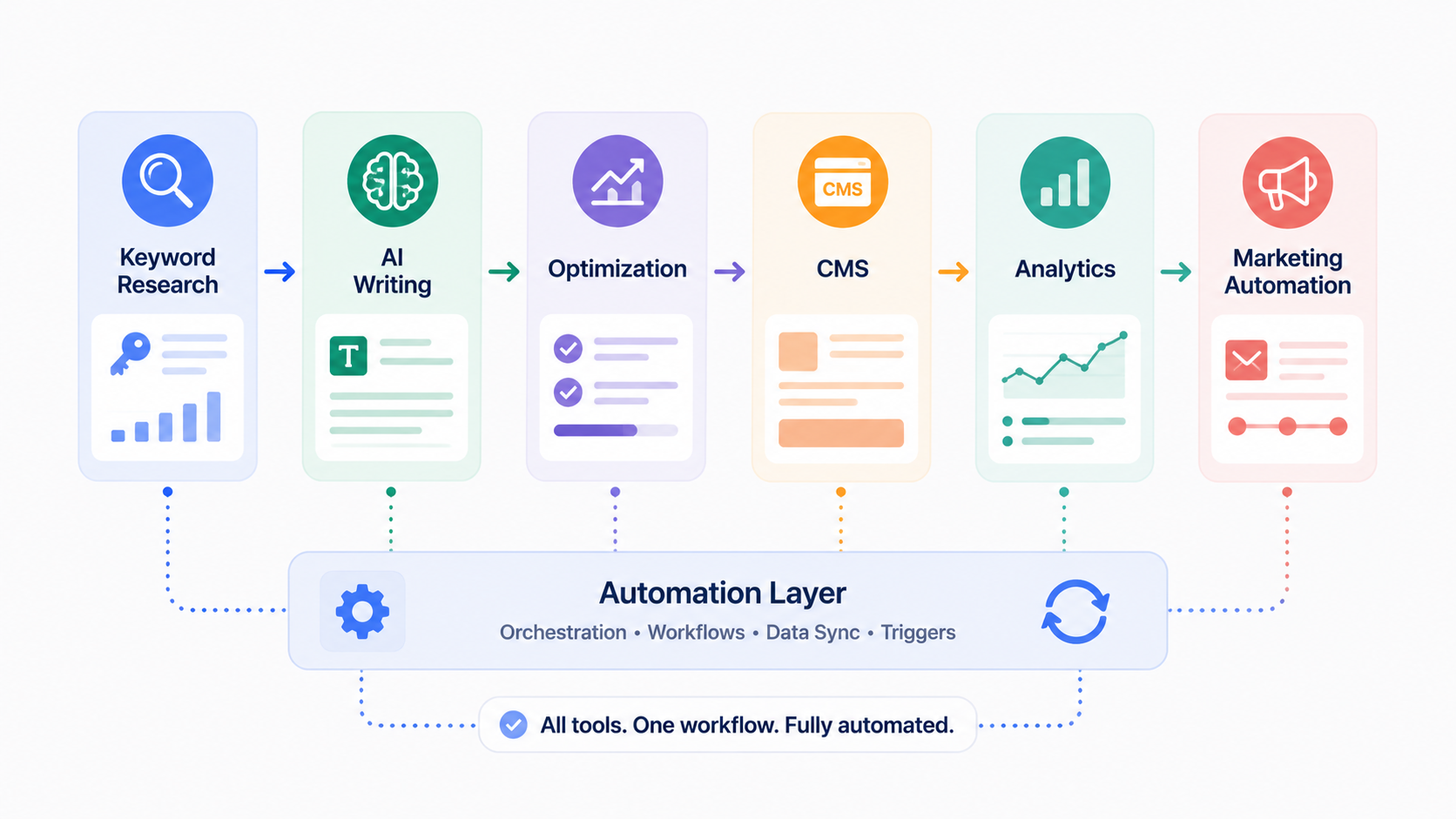
What Automation Tools and Integrations Should You Implement?
An end-to-end pipeline means stitching several specialized tools together. Rather than hunting for one monolith that does everything (it doesn’t exist), most companies that succeed assemble a stack of best-in-class tools that work together, each owning a specific function.
Core Platform Components You Need
At minimum, your stack needs these functional pieces working together:
- Keyword research and ideation: Tools like SEMrush, Ahrefs, or Moz that identify opportunities through search volume, competition analysis, and intent classification. These tools also track your rankings and identify content refresh opportunities.
- Content generation AI: Platforms like OpenAI’s GPT-4, Anthropic’s Claude, or specialized SEO AI tools that transform briefs into optimized drafts. Different tools have different strengths—some are better at long-form content, others at product descriptions.
- Editing and optimization: Tools like Surfer SEO or Clearscope that analyze top-ranking competitors and suggest specific improvements. These tools create structured optimization reports that your editors follow.
- Publishing and CMS integration: Your chosen CMS (WordPress, HubSpot, Webflow, etc.) plus middleware that automates data flow and publishing. This might be native integrations or API-based workflows.
- Analytics and measurement: Google Analytics and Google Search Console for performance data, plus aggregation tools like Data Studio or custom dashboards that centralize insights.
- Workflow and project management: Tools like Monday.com, Asana, or Notion that coordinate the entire pipeline—track which pieces are in ideation, generation, approval, publishing, or measurement phases.
You don’t have to build a custom platform from nothing. Most companies do fine with off-the-shelf tools connected through APIs and middleware. That route implements faster and maintains easier than custom infrastructure.
Integration Approaches and Methods
Three practical ways to wire these tools into a working pipeline:
- API-native integration: Tools with direct, documented API connections. Most reliable but requires technical expertise or thorough API documentation review. Your developers can build custom integrations that pull data from tool A and push to tool B automatically.
- Middleware services: Platforms like Zapier, Make (formerly Integromat), or Integromat that provide pre-built connectors between common tools. Often with limited flexibility but very easy setup—usually no coding required. You configure workflows visually.
- Custom scripts: Python or JavaScript scripts that pull data from one tool’s API and push to another, providing maximum flexibility. Requires development resources but enables unique workflows that middleware doesn’t support.
Most pipelines mix all three: native integrations for the mission-critical links (your CMS publishing pipeline has to be rock solid), middleware for common workflows (syncing data between tools), and custom code for the unique stuff (your specific measurement dashboards).
Start with middleware (Zapier) if you want a fast launch with little technical overhead. Move to native integrations as you scale and reliability gets critical. Add custom code only where the pre-built options fall short.
Marketing Automation Integration and Amplification
Marketing automation software like HubSpot, Marketo, or ActiveCampaign can multiply your SEO pipeline’s reach. Your content doesn’t live alone. It’s one piece of a wider marketing system.
The integration runs like this. Your SEO content publishes, and your marketing automation system handles the downstream moves on its own: emails the published article to relevant segments of your subscriber list, triggers lead nurturing based on which pages prospects visit, tracks which pieces drive conversions and feeds that back to your SEO team, and lines up email campaigns with content releases for maximum visibility.
Your platform should feed published content metadata into the marketing automation system automatically. URL, topic, primary keyword, target audience, publication date, relevant tags. The marketing system uses that metadata to decide which subscribers hear about which content.
Take an example. You publish a piece on “AI keyword research.” The platform notifies your marketing automation system. The system emails it to subscribers interested in keyword research and AI tools. They click through, read, and start weighing your SEO tools. Some download your free keyword research template, your lead magnet. The platform captures those conversions and reports them back, confirming the topic was worth doing.
That integration stretches your content’s reach. Instead of waiting for people to find you in Google, you push it to interested audiences by email. Traffic growth and conversions both move faster.
What Are Common Pitfalls and How Do You Avoid Them?
Companies rolling out SEO automation hit the same predictable snags. Learning from other people’s mistakes saves you expensive failures and gets you to results quicker.
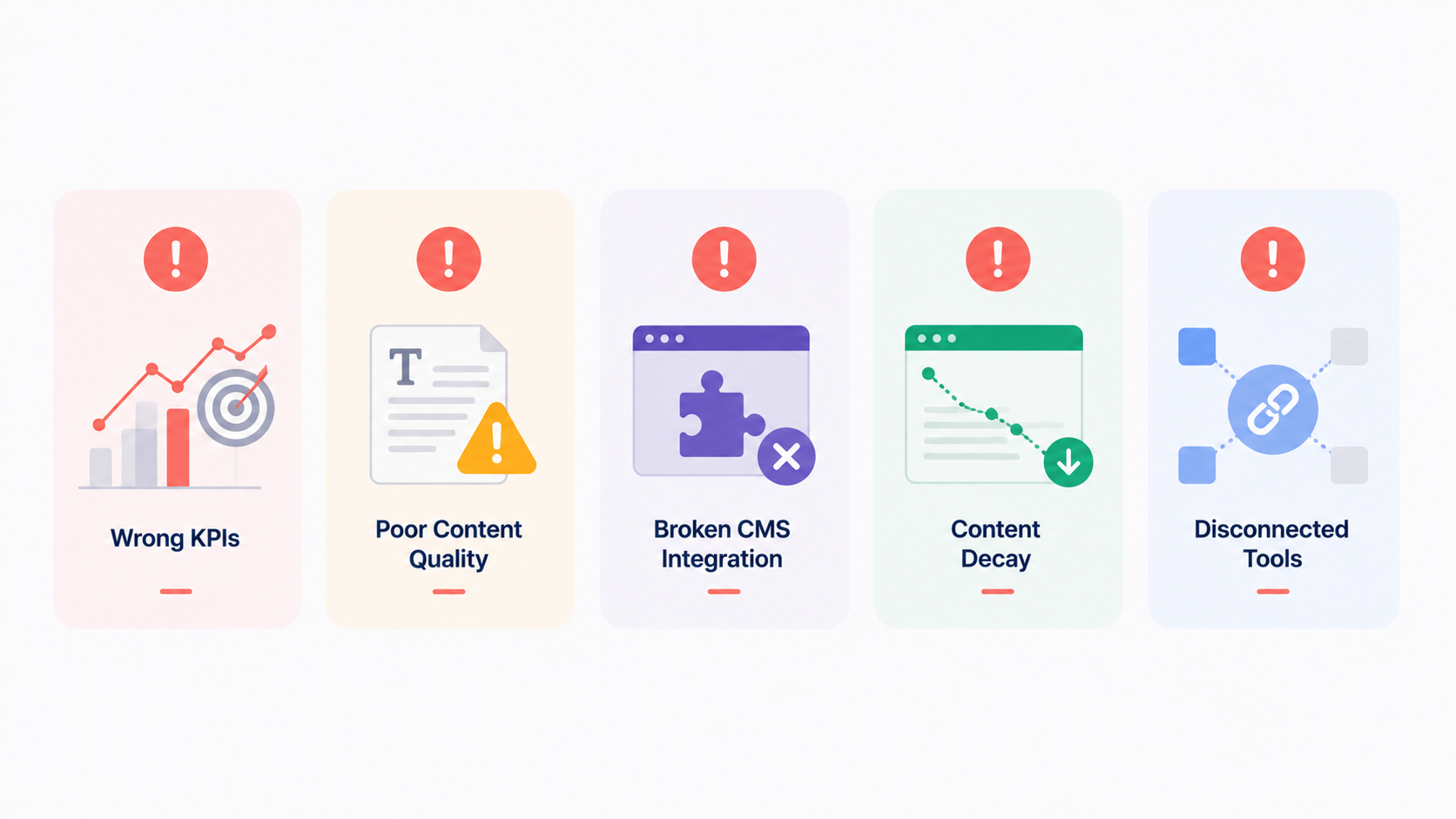
Pitfall 1: Optimizing for the Wrong Metrics
The most common failure is automating production without knowing what success means. Teams ship hundreds of pieces, feel productive, celebrate “50 pieces published monthly!” and drive almost nothing. Traffic’s flat. Revenue hasn’t budged. They’re shipping more, and none of it moves the needle.
This is what happens when you optimize for content velocity (50 pieces a month) instead of business impact (revenue from organic search). The team feels productive because they’re busy, but the content isn’t strategically worth much.
Dodge it by defining your primary KPI first, before you build anything. The strategy flows from the business goal. Goal is organic revenue? Tune ideation for commercial-value, high-conversion topics, not just high search volume. Goal is brand authority? Optimize for topical authority and full vertical coverage. Goal is qualified leads? Optimize for keywords where searchers are actively hunting for solutions.
Picking the KPI before automating matters enormously. Refocusing a pipeline after you’ve published 200 pieces aimed at the wrong metric is far harder. Start with the alignment.
Pitfall 2: Neglecting Content Quality for Speed
Automation can erode quality when you chase speed and drop standards. AI-generated content that hasn’t been properly edited, QA’d, or optimized reads thin and doesn’t rank. You end up publishing more content that ranks nowhere, which is worse than publishing less that ranks well. More mediocre content isn’t success. It’s just more nobody reads.
Prevent it with robust automated QA plus human editorial review that stays in the loop. The goal was never to cut human judgment. It’s to speed the timeline by having humans edit strong first drafts instead of writing cold. Set quality standards that don’t bend for speed. If your standard is 1,500+ word articles, don’t start shipping 800-word pieces to juice velocity. If it’s 3+ internal links per piece, don’t slide to 1. If it’s 3+ sources cited, don’t skip verification. Hold the line as you scale.
Pitfall 3: Misalignment Between Ideation and CMS Integration
Plenty of teams build excellent topic pipelines and then fail to make the generated content publish correctly to their CMS. Metadata doesn’t populate. Internal links break. Schema doesn’t render. You publish content that looks wrong in search results or breaks your site architecture, and now you’re doing manual rework that defeats the automation.
Fix it by testing your CMS integration hard before full rollout. Don’t publish 100 pieces and cross your fingers. Run 10-20 test pieces through the complete pipeline. Confirm they show correctly in your CMS. Check that internal links work. Inspect meta tags and schema in the page source. Test across devices and browsers. Scale only after the technical integration works cleanly.
Your CMS integration is critical infrastructure. Invest in testing before scaling. A few days of testing now saves weeks of manual fixing later.
Pitfall 4: Ignoring Algorithm Changes and Content Decay
Once the pipeline matures and you’ve got dozens or hundreds of pieces live, the older content starts to decay. Search intent shifts. Competitors publish something better. Google’s algorithm changes. Your older pieces slide down the rankings. Without continuous monitoring and update workflows, you build a graveyard of formerly-ranking content.
Bake in content monitoring from day one. The platform should flag underperformers for refresh. A piece published 90 days ago that still isn’t ranking is worth investigating. Surface competitive analysis showing what rivals are doing differently. Trigger updates automatically.
Budget ongoing resources for refreshing old content, not just making new content. Plenty of strong pipelines split it 40% new content and 60% maintaining and updating what’s already there. Your old content is an asset. Invest in keeping it competitive.
Pitfall 5: Choosing Tools That Don’t Integrate
Building a pipeline from tools that won’t talk to each other breeds manual workarounds that kill efficiency. You end up copy-pasting between systems, keeping duplicate data in spreadsheets, and missing automation you should have. Your team burns time moving data between tools instead of working on strategy and quality.
When you pick tools, treat integration capability as a primary requirement. Ask vendors straight: “Can this push data to our CMS automatically? Pull from Google Analytics? Integrate with our marketing automation platform? Native API integrations or Zapier support?” Tools with strong API docs and pre-built integrations compound the gains. Skip point solutions that only fix one problem in isolation.
The best stacks run tools that work as a system. One tool feeds the next. Output becomes input. Minimal manual transfer. That interconnection is what makes real automation possible.
Building an end-to-end SEO automation pipeline is a strategic bet on sustainable organic growth. Instead of manually ideating topics, writing content, reviewing drafts, and publishing one piece at a time, an automated content pipeline for SEO runs the high-volume work consistently and predictably while your team owns strategy, quality, and continuous improvement.
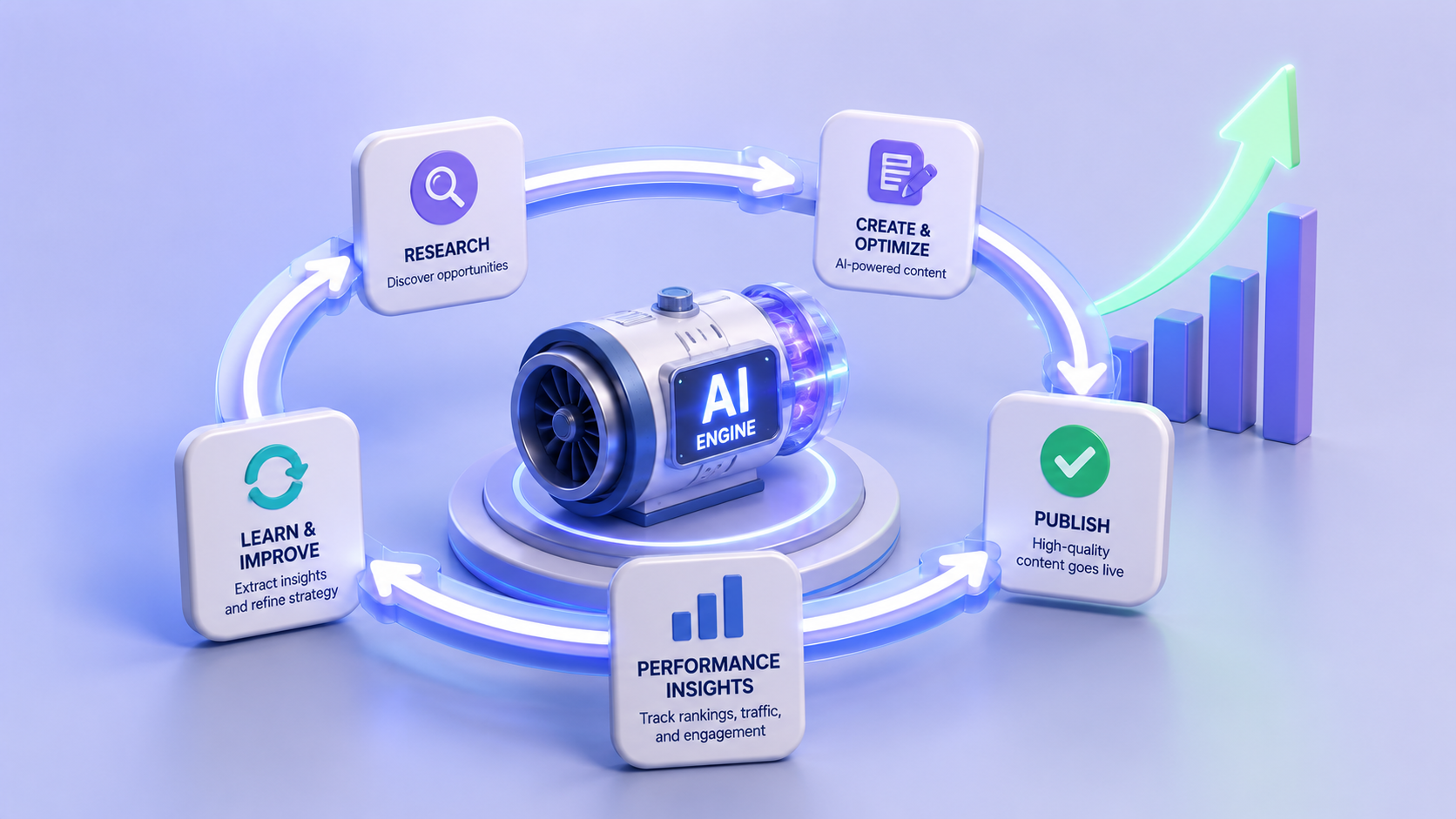
The pipeline moves in order, from data-driven ideation through AI-assisted generation, automated editorial QA, clean CMS publishing, and continuous performance measurement. Each phase feeds the next, and performance data loops back to sharpen future content selection and generation.
Your rollout should start with a single platform or integrated stack covering 2-3 core functions first, usually ideation plus generation plus publishing. Define your success metrics before you build. Put rigorous QA controls in place to stop quality from decaying. Scale carefully, measuring impact at each stage before you widen the scope.
Within 6-12 months of a well-run pipeline, most companies see real results: 2-3x more published content, 60-70% cuts to time-to-publish, and 25-50% organic traffic growth from better publication frequency and quality. None of it is guaranteed. Results ride on strategy quality, niche competitiveness, and execution discipline.
Treat automation as a system, not just faster content. When ideation, generation, publishing, and measurement all work together, feeding data back through the loop, you build a durable edge in organic search. Your competitors are still shipping quarterly whitepapers. You’re publishing optimized content weekly, learning from every piece, and improving the system as you go. That compounding is what automation buys you.
Ready to build your own SEO automation pipeline? Start with this comprehensive guide to automating SEO content creation with AI. Then explore our AI keyword strategy guide to learn how to identify high-impact topics. Your automated content pipeline starts with strategy—let’s build it together.
